Most hospitals think ABDM integration is just about connecting a few APIs. That assumption is exactly where things start to break. ABDM API integration is not a single API connection. It is a multi-stage process that involves sandbox onboarding, milestone-based implementation, and secure data exchange using standardized protocols.
Without a clear roadmap, it quickly becomes complex, especially when both technical and compliance requirements come into play.
Teams often struggle to understand where to begin, how different components like ABHA, HIP, and HIU fit together, and what it actually takes to move from testing to production.
And the cost of getting it wrong is high.
On the other hand, Delays in integration can slow down your hospital’s digital readiness and create gaps in interoperability when it matters most.
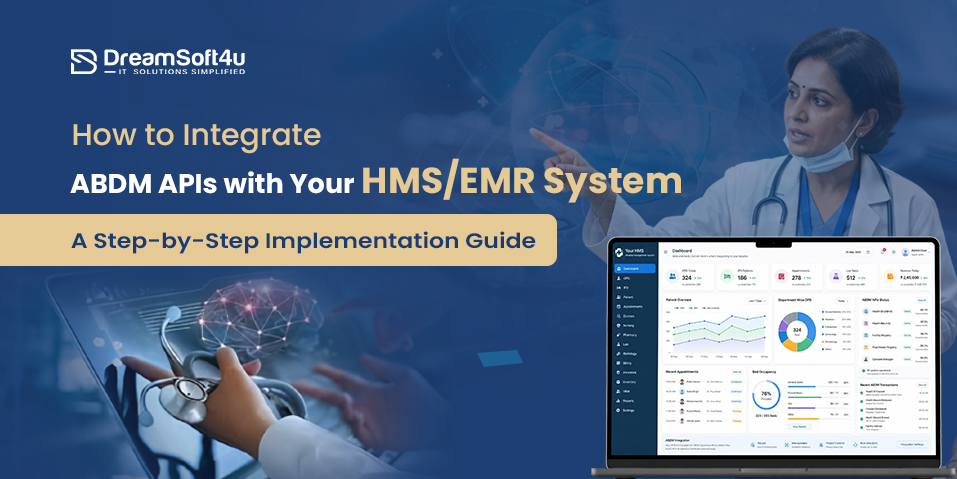
Now the question is – How to Integrate ABDM APIs with Your HMS/EMR System?
This guide is all you need to clear your doubts.
In this blog, you will get:
- What is ABDM?
- Key components of ABDM
- How ABDM integration actually works
- Step-by-step guidance to integrate ABDM APIs with your HMS or EMR system
- All prerequisites you need before starting development
- Benefits of ABDM APIs integration
By the end, you will have a structured path to move from planning to successful ABDM integration Services without unnecessary delays.
What is ABDM?
The Ayushman Bharat Digital Mission (ABDM), led by the National Health Authority, is India’s initiative to build a connected digital healthcare ecosystem.
It allows healthcare providers to securely share patient data across systems using a unique ABHA (Ayushman Bharat Health Account) number.
Instead of health records staying locked within one hospital or clinic, ABDM enables them to move across platforms with patient consent. This improves access to medical history, reduces duplication, and supports better clinical decisions.
For hospitals and EMR or HMS platforms, ABDM provides standardized APIs and data protocols that make this exchange possible in a secure and structured way.
In simple terms, ABDM connects fragmented healthcare systems into one unified network where patient data can be accessed, shared, and managed efficiently.
Key Components of the ABDM Ecosystem
To understand how ABDM integration works, you need clarity on the core components that power the entire ecosystem. These are the building blocks your HMS or EMR system will interact with.
Here are the most important ones:
- ABHA (Ayushman Bharat Health Account): This is a unique 14-digit ID assigned to every patient. It acts as a digital identity that links all their health records across different hospitals and platforms.
- Healthcare Professionals Registry (HPR): A verified database of doctors and medical staff. It ensures only authenticated professionals are part of the ecosystem.
- Health Facility Registry (HFR): Your hospital or clinic must be registered here. It gives your facility a unique identity within ABDM.
- Personal Health Records (PHR): A patient-facing system where individuals can view, manage, and share their health data. All data sharing happens only after patient consent.
- Consent Management System: This is where ABDM becomes powerful. Patients control who can access their data, what data is shared, and for how long. No data moves without approval.
- HIP and HIU Roles: Defines whether your system shares patient data (HIP) or requests and uses data (HIU) within the ABDM ecosystem.
How ABDM Integration Actually Works?
ABDM ABHA Integration Services connect your HMS or EMR system to the National Health Authority ecosystem using APIs.
It links patient records to a unique ABHA ID and enables secure, consent-based data sharing across hospitals, labs, and clinics. Your system converts data into standardized formats like FHIR, so different platforms can understand it.
In simple terms, it creates a secure connection where patient data can be shared smoothly, but only with proper approval.
Want to integrate ABDM APIs with your HMS or EMR system?
Skip the trial and error – DreamSoft4U delivers end-to-end ABDM integration with full compliance, FHIR setup, and sandbox-to-production support.
6 Benefits of ABDM APIs with HMS/EMR System
Here are six major benefits of implementing ABDM integration solutions with your HMS or EMR system:
1. Faster Patient Registration and Better Experience
With ABDM API integration, patients can share their details instantly using ABHA through QR-based “scan and share.” This reduces registration time to just a few minutes and removes manual data entry errors. As a result, front-desk workload decreases and patient wait times improve significantly.
2. Access to Complete Patient History
Doctors can view a patient’s medical records, prescriptions, lab reports, and discharge summaries from different providers in one place. This helps in faster diagnosis, avoids guesswork, and ensures better treatment decisions based on complete health data.
3. Reduced Paperwork and Improved Efficiency
ABDM integration digitizes patient records and automates routine workflows. This reduces dependency on physical files, lowers administrative costs, and allows hospital staff to focus more on patient care instead of manual documentation.
4. Secure and Consent-Based Data Sharing
Patient data is shared only after explicit approval through a consent management system. Patients can control who accesses their data and for how long. All exchanges are encrypted and follow standard formats like FHIR, ensuring strong security and compliance.
5. Faster Insurance Claims Processing
With integration into systems like the National Health Claims Exchange, hospitals can submit and process insurance claims more efficiently. This reduces delays, minimizes errors, and improves overall revenue cycle management.
6. Higher Trust and Regulatory Compliance
ABDM-integrated hospitals are listed in verified registries such as HFR and HPR. This increases visibility, builds patient trust, and ensures your organization meets government standards for digital healthcare systems.
Prerequisites Before Starting ABDM API Integration
Before you start integrating ABDM APIs with your HMS or EMR system, you need to ensure both technical and regulatory readiness. Missing any of these can delay testing or certification later.
Here are some of the most important prerequisites for ABDM APIs integration:
ABDM Sandbox Access and API Credentials
Register your platform on the ABDM sandbox portal to access APIs in a controlled testing environment. You will receive a Client ID and Client Secret, which are required to authenticate every API request before moving to production.
Bridge Service and API Connectivity
You need to build a bridge layer that connects your HMS or EMR system with the ABDM gateway. This layer handles all API calls, manages sessions, and ensures smooth communication between your system and the ABDM network.
FHIR Compliance:
Your system must be capable of generating and consuming health data in FHIR format. This is essential because ABDM follows standardized data structures, allowing different systems to exchange information without compatibility issues.
Security and Authentication Setup:
Implement secure authentication using OAuth 2.0 and ensure all data is encrypted during transmission and storage. You also need proper validation checks to prevent unauthorized access and maintain patient data privacy.
Callback URL Configuration
Set up callback endpoints in your system to receive real-time updates from ABDM. These include consent approvals, data sharing requests, and status notifications, which are critical for workflow automation.
Health Facility Registry (HFR) Registration:
Your hospital or clinic must be registered in the Health Facility Registry (HFR) to obtain a unique Facility ID. Without this, your system cannot participate in ABDM data exchange.
Healthcare Professionals Registry (HPR) Registration
All doctors and healthcare professionals should be registered in the HPR. This ensures that only verified practitioners are part of the ecosystem and can access or share patient data.
ABHA Integration Capability
Your system should support creating, verifying, and linking ABHA IDs. Since all patient data is mapped to ABHA, this becomes a core requirement for any integration.
Milestone-Based Integration Readiness (M1–M3)
ABDM follows a phased approach, so your system must be prepared for each (M1, M2, M3) module:
- M1: Verify patient and provider identities using ABHA and HPR
- M2: Enable your system as a Health Information Provider (store and share records securely)
- M3: Enable your system as a Health Information User (request and access data with consent)
When these prerequisites are properly set up, your integration process becomes much smoother, faster, and aligned with ABDM compliant solutions and requirements.
Not sure if your HMS is ready for ABDM integration?
Let DreamSoft4U audit your system, map your milestones, and build a clear integration roadmap – so you go live faster with zero compliance gaps.
How to Integrate ABDM APIs with Your HMS/EMR System? Step-by-Step
ABDM integration becomes much easier when you approach it in the right order. Instead of trying to handle everything internally, most successful hospitals combine internal coordination with expert execution.
Here’s how the process actually works from your side:
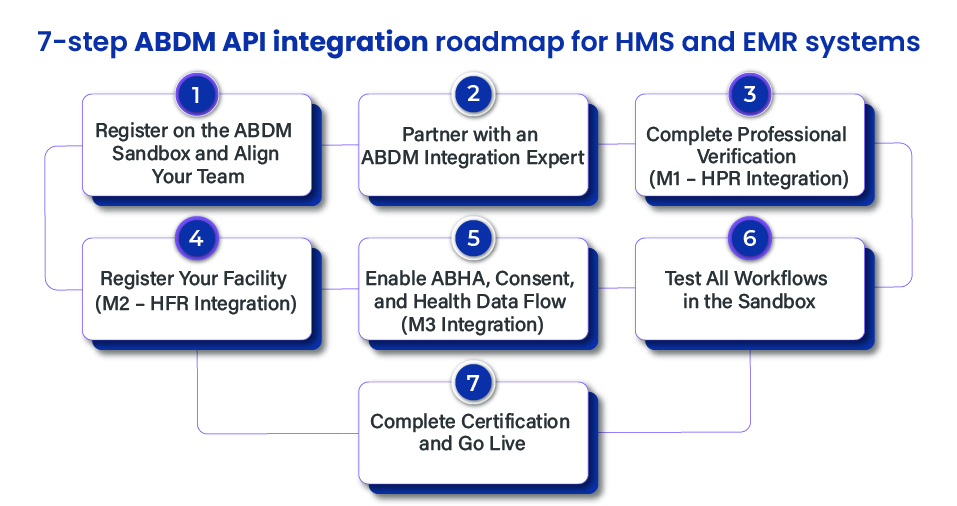
Step 1. Register on the ABDM Sandbox and Align Your Team
Start by registering your system on the ABDM sandbox portal.
This gives you access to APIs, documentation, and the testing environment.
From your side, you should:
- Create the developer account
- Get Client ID and Client Secret
- Identify whether you will act as HIP, HIU, or both
At the same time, align your internal team.
Make sure your tech, operations, and compliance teams understand:
- What ABDM requires
- What data will be shared
- What workflows will change
This clarity helps avoid confusion later.
Step 2. Partner with an ABDM Integration Expert
At this stage, you should bring in an experienced integration partner.
Because ABDM is not just about APIs. It involves:
- FHIR data structuring
- Consent workflows
- Secure architecture
- Compliance validation
Working with a specialized partner like DreamSoft4U ensures the execution is done correctly.
Your role here is simple:
- Share your current HMS or EMR architecture
- Define your integration goals
- Align timelines and expectations
Your partner will handle the technical execution while keeping you involved in key decisions.
Step 3. Complete Professional Verification (M1 – HPR Integration)
Now your integration partner will start with the first milestone.
They will:
- Integrate HPR APIs
- Register your doctors and staff
- Validate professional credentials
From your side, you need to:
- Provide accurate doctor and staff details
- Ensure licenses and qualifications are correct
Once completed:
- Each professional gets a verified HPR ID
This step builds the trust layer of your system.
Step 4. Register Your Facility (M2 – HFR Integration)
Next, your partner will register your hospital or clinic in the Health Facility Registry.
They will:
- Submit facility details
- Configure your system as a Health Information Provider (HIP)
- Link your doctors to the facility
Your responsibility:
- Share correct facility information
- Validate services, departments, and structure
After approval:
- You receive an HFR ID
This ID acts as your system’s official identity in ABDM.
You also need to:
- Link all HPR-registered professionals to your facility
At this stage, your system is recognized as a verified Health Information Provider (HIP).
Now your organization is officially part of the ABDM ecosystem.
Step 5. Enable ABHA, Consent, and Health Data Flow (M3 Integration)
This is where your system becomes fully functional.
Your integration partner will handle:
- ABHA creation and verification setup
- Consent management workflows
- FHIR data mapping for all medical records
- Care context linking for patient visits
From your side, you should:
- Review how patient data flows inside your system
- Ensure your staff understands consent handling
- Validate how reports and prescriptions are structured
This step directly impacts real patient experience, so your involvement matters.
Step 6. Test All Workflows in the Sandbox
Before going live, everything must be tested.
Your partner will:
- Run end-to-end testing
- Validate API responses
- Fix any technical issues
Your role:
- Verify real-world scenarios
- Check patient registration, consent, and data flow
- Ensure workflows match your hospital operations
This is where you confirm everything works as expected.
Step 7. Complete Certification and Go Live
Once testing is complete, your partner will initiate production approval.
They will handle:
- Sandbox exit process
- Security audits (VAPT/WASA)
- Compliance checks
From your side:
- Approve final system behavior
- Ensure operational readiness
After approval:
- Production credentials are issued
- Your system goes live
Now your HMS or EMR is fully ABDM-compliant.
What You Should Focus On Throughout
While your integration partner handles the technical side, your focus should stay on:
- Data accuracy
- Workflow alignment
- Staff readiness
- Compliance understanding
That’s what ensures a smooth rollout.
Now that you understand how the integration process works step by step, the next question is how to execute it smoothly without delays or errors.
Key Tips for Successful ABDM APIs Integration
Even if you follow all the steps correctly, small gaps in execution can slow down your integration. These practical tips will help you avoid common issues and ensure a smoother rollout:
- Use a Middleware Layer for FHIR Conversion: If your current HMS or EMR does not natively support FHIR, use a middleware layer to convert your existing data into ABDM-compliant formats. This avoids major system rework.
- Handle Authentication and Security Properly: Make sure your system securely manages OAuth tokens, uses TLS 1.2+ encryption, and protects sensitive data like ABHA IDs and OTPs. Missing this can break compliance.
- Prepare for Asynchronous API Flows: Many ABDM workflows, like consent approval and data sharing, do not happen instantly. Your system must handle callbacks and asynchronous responses correctly.
- Implement Strong Consent Management Logic: Every data exchange must be tied to valid patient consent. Ensure your system can handle consent requests, approvals, denials, and revocations without errors.
- Follow Data Standards and API Best Practices: Always use the latest API versions and ensure your data follows standards like FHIR, SNOMED-CT India, or ICD-10. This ensures compatibility across systems.
- Test Thoroughly Before Going Live: Do not rush to production. Test all flows in the sandbox, including ABHA linking, consent handling, and data exchange. This is where most real issues get caught.
These practices help you avoid rework, reduce delays, and ensure your ABDM integration works reliably in real-world scenarios.
Why Choose DreamSoft4U for Seamless ABDM APIs Integration with Your HMS/EMR System?
ABDM integration involves APIs, FHIR standards, consent flows, and compliance. If not handled properly, it can delay your go-live and create issues later.
That is why you need a reliable partner like DreamSoft4U who understands both technology and healthcare workflows.
DreamSoft4U has hands-on experience with EMR, EHR, and interoperability systems. They build solutions that fit real hospital operations, not just technical requirements. This helps you move faster without rework or compliance risks.
Why choose us?
- 23+ years of experience with 1600+ projects delivered
- Strong expertise in ABDM, FHIR, and HL7 integration
- End-to-end support, from sandbox to production
- Compliance-focused development aligned with healthcare standards
- 98% client retention, showing long-term trust
- Flexible engagement models based on your needs
Ready to implement ABDM without delays?
Every week without ABDM integration risks your compliance, drains efficiency, and costs you patients. DreamSoft4U gets you live – fast and fully certified.
Conclusion
ABDM API integration is not just about connecting systems. It’s about getting the entire flow right, from planning to execution.
When done properly, it helps your hospital run faster, reduces manual work, and improves how patient data is managed and shared.
We hope this guide helped you clearly understand what ABDM is, how ABDM API integration works, and what it actually takes to implement it.
Now it’s your turn to move forward with clarity and confidence.
If you want to get this right from the start and build ABDM compliant software, connect with our experts to plan and implement your integration the right way.
FAQs
ABDM API integration connects your HMS or EMR system with India’s digital health ecosystem. It allows hospitals, labs, and clinics to securely share patient data using standardized formats, but only after patient consent.
It helps you improve patient experience, reduce manual work, and access complete medical history in one place. It also prepares your hospital for future digital healthcare standards and interoperability.
ABHA is a unique 14-digit health ID assigned to patients. It links all their medical records across different providers and allows secure sharing of data whenever the patient gives permission.
HIP is a system that shares patient data, such as hospitals or labs. HIU is a system that requests and uses that data for treatment or analysis, always based on patient consent.
The timeline depends on your system readiness and complexity. With proper planning and an experienced partner, it can take a few weeks to a few months, including testing and certification.
Common challenges include FHIR data mapping, managing consent workflows, handling API security, and meeting compliance requirements. Most issues happen when these are not planned properly from the start.
Yes, ABDM integration involves APIs, data standards, and security layers. Most hospitals either use their internal tech team or work with an experienced integration partner to handle it correctly.
Once your system goes live, you can securely share and access patient data, reduce paperwork, improve workflows, and become part of a connected healthcare ecosystem.