






India’s healthcare system is rapidly moving toward a connected digital ecosystem.
ABDM (Ayushman Bharat Digital Mission) is at the center of this shift. For hospitals, ABDM integration services are no longer optional.
But this is where most hospitals struggle.
You are asked to implement M1, M2, and M3. Yet the guidance often stays at a high level, without explaining how these modules actually work inside real hospital systems.
Because ABDM is not just about IDs or registration, it is a structured shift from scattered data to a connected, consent-driven healthcare system. And that shift only works when each module is understood in the right sequence.
Where M1 builds your digital identity layer, M2 connects and structures your patient records, and M3 enables secure data exchange across hospitals.
You miss this flow, and the entire implementation becomes slow and confusing.
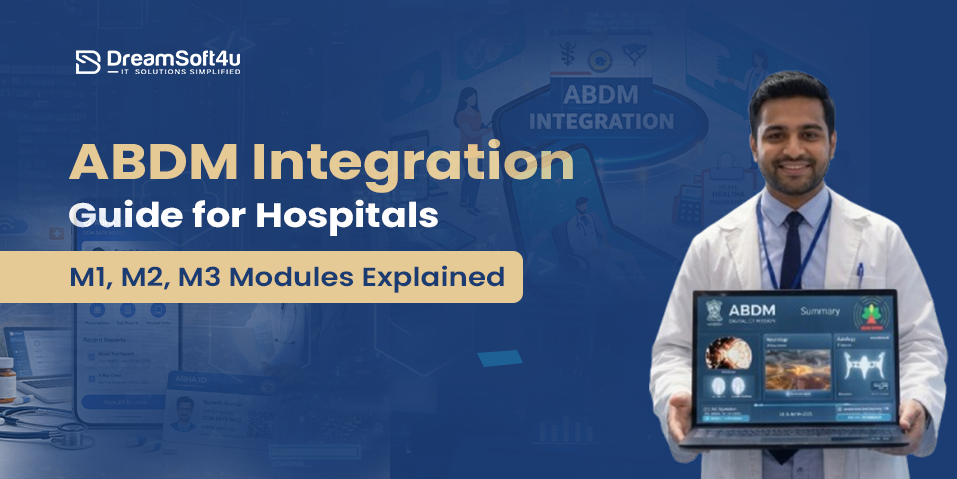
So, if you are also confused about ABDM integration and do not fully understand its modules, this ABDM integration guide will give you that clarity.
In this guide, you will understand:
- What is ABDM
- Modules of ABDM
- Step-by-step ABDM integration process for hospitals
- Benefits of ABDM integration
By the end of this guide, you will understand what M1, M2, and M3 really mean, how they connect with your hospital systems, and the exact steps required to implement ABDM in a practical way.
So, without any further delay, let’s dive in!
What is ABDM?
Ayushman Bharat Digital Mission (ABDM) is India’s initiative to build a connected digital healthcare system. It aims to make healthcare data accessible, secure, and easy to use across hospitals, doctors, and patients.
At the center of ABDM is a unique health ID called ABHA. This acts as a digital identity for every patient and helps link their medical records across different hospitals, labs, and clinics.
This allows hospitals to access the right information at the right time, but only with the patient’s consent.
It also includes verified registries for healthcare professionals and facilities, ensuring standardization across the network. Most importantly, all data sharing happens only with patient consent.
For hospitals, this means faster registration, better access to records, and smoother data exchange. In simple terms, ABDM connects healthcare systems so care can be delivered more efficiently.
Key Components of ABDM
Here are some key components of ABDM:
1. ABHA (Ayushman Bharat Health Account)
ABHA is a unique 14-digit health ID given to every patient. It acts as a digital identity and connects their medical records across different hospitals and providers.
It also comes with an ABHA address, which is a simple, shareable ID like yourname@abdm that makes accessing and sharing records easier.
2. Health Facility Registry (HFR)
HFR is a national database of healthcare facilities. Hospitals, clinics, and labs must register here to become part of the ABDM network and participate in data exchange.
3. Healthcare Professionals Registry (HPR)
HPR is a verified registry of healthcare professionals. Doctors, nurses, and other medical staff are listed with their credentials, ensuring trust and standardization across the system.
Not Sure Which ABDM Modules Your Hospital Needs?
Our experts will map M1, M2 and M3 to your existing HMS and give you a clear integration roadmap — free of cost.
Get Your Free ABDM Roadmap ↗Step-by-Step ABDM Integration Process for Hospitals
Step 1: How to Register Healthcare Professionals (M1)
What is M1?
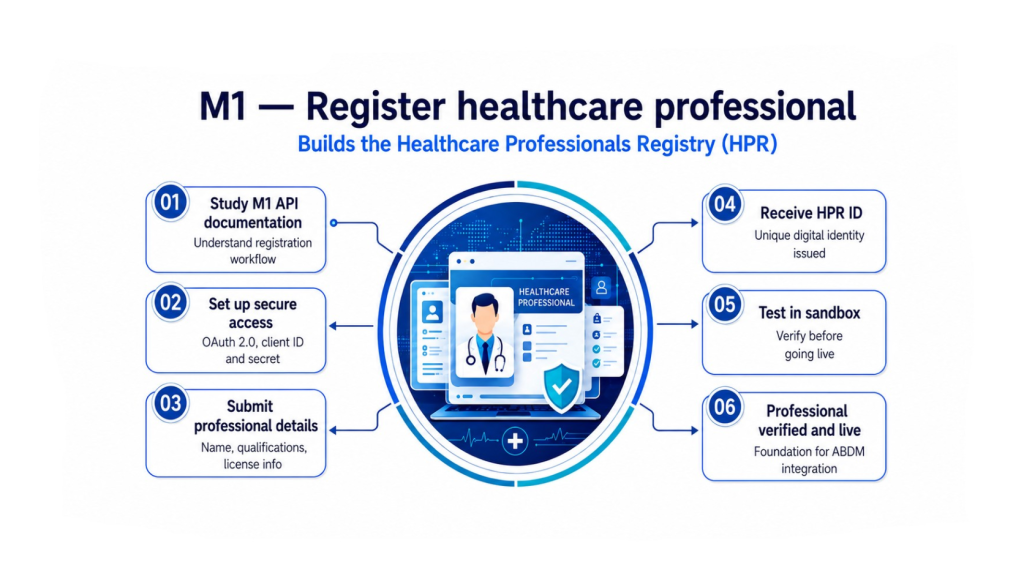
The M1 module focuses on registering healthcare professionals such as doctors, nurses, and medical staff in the national Healthcare Professionals Registry (HPR). It ensures that only verified and qualified professionals are included in the system.
Steps to Register
- Understand the process: Go through the M1 API documentation to understand how the registration works.
- Set up secure access: Use OAuth 2.0 for authentication. You will receive credentials like Client ID and Secret after registering on the ABDM sandbox.
- Submit professional details: Provide details such as name, qualifications, and license information through the system or APIs.
- Get HPR ID: After successful verification, each professional receives a unique HPR ID that serves as their digital identity.
- Test in sandbox: Use the sandbox environment to test and ensure the process works correctly before going live.
The M1 module is the foundation of ABDM integration (also known as NDHM integration), ensuring that healthcare professionals are verified, standardized, and securely registered in the system.
Step 2: How to Register Healthcare Facilities (M2)
What is M2?
The M2 module is focused on registering healthcare facilities like hospitals, clinics, and labs in the Health Facility Registry (HFR). This ensures that all facilities are properly listed and part of a standardized system.
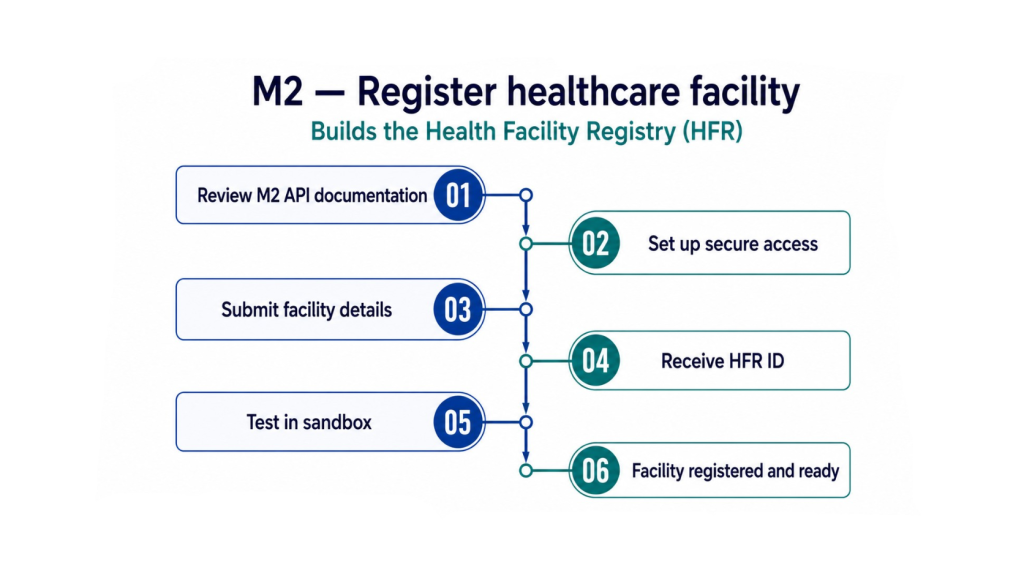
Steps to Register
- Understand the process: Review the M2 API documentation to clearly understand how facility registration works.
- Set up secure access: Use OAuth 2.0 authentication, similar to M1, to securely connect to the system.
- Submit facility details: Provide key information such as facility name, type, location, contact details, and services offered.
- Get HFR ID: After successful registration, your facility receives a unique HFR ID.
- Test in sandbox: Test the complete process in the sandbox environment using the official ABDM sandbox APIs before moving to production.
The M2 module ensures your facility is correctly registered and ready to participate in the ABDM network, making data management and accessibility more structured.
Step 3: How to Link and Share Health Data (M3)
What is M3?
The M3 module focuses on managing and securely sharing health records across the healthcare system. It allows patients to give consent before their data is shared, helping providers access the right information for better care.
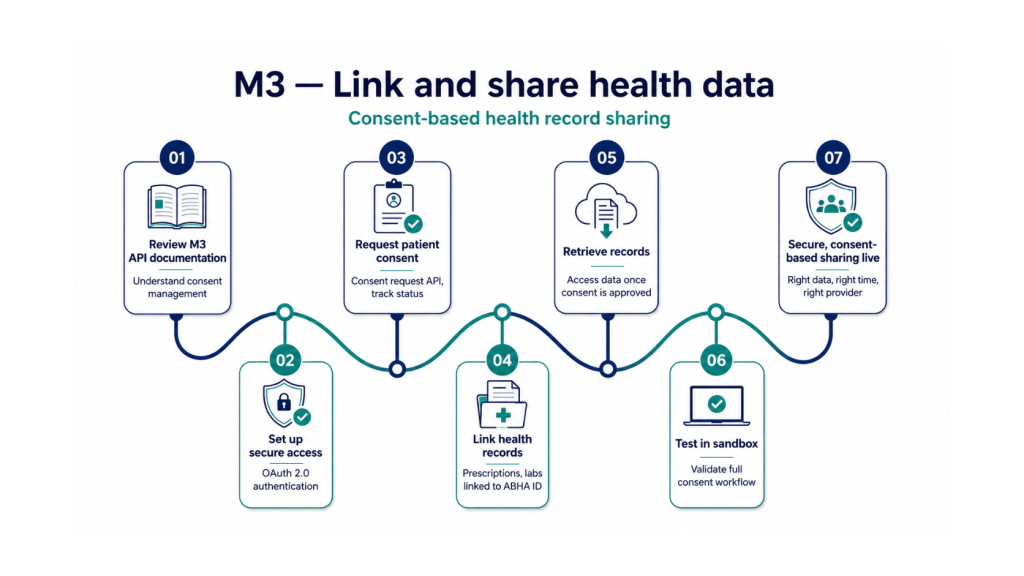
Steps to Register
- Understand the process: Review the M3 API documentation to understand consent management and data sharing.
- Set secure access: Use OAuth 2.0 for secure authentication, similar to M1 and M2.
- Request patient consent: Ask for permission to access patient records using consent request APIs and track status when needed.
- Link health records: Connect electronic health records (EHR) such as prescriptions, lab reports, and medical history to their ABHA ID.
- Retrieve records: Once consent is approved, access the required health data through the system.
- Test in sandbox: Test the complete workflow in the sandbox to ensure everything functions smoothly.
M3 enables secure, consent-based data sharing, allowing healthcare providers to access the right information at the right time.
Final Steps After ABDM Integration
Once M1, M2, and M3 are fully implemented, a few final steps are needed to ensure your system runs smoothly and stays compliant.
- Complete end-to-end testing: Test all workflows in the sandbox to confirm that each module works correctly before going live.
- Move to production: After successful testing, apply for production access and start using ABDM in real scenarios.
- Maintain compliance: Follow ABDM guidelines regularly to ensure your system meets all security and data privacy standards.
- Track system performance: Monitor your system continuously and fix any technical or security issues to keep operations stable.
Following these steps helps ensure a smooth transition to ABDM while keeping your system secure and reliable.
Key Technical Considerations
- OAuth 2.0: Used to securely authenticate and connect your system with ABDM APIs.
- FHIR R4: Standard format required for structuring and exchanging health data across systems.
- TLS 1.2 or higher: Ensures all data shared over the network is encrypted and secure.
- AES-256 encryption: Protects stored data by keeping it encrypted at rest.
- JWT tokens: Used for secure API access and authorization between systems.
6 Benefits of ABDM Integration for Hospitals
Here are six major benefits of ABDM integration for hospitals:
1. Faster Patient Registration
ABDM reduces OPD registration time by allowing patients to share their details instantly using ABHA. This removes manual form-filling, speeds up front desk operations, and improves overall patient flow, especially in busy hospitals.
2. Access to Complete Patient History
With patient consent, doctors can access past records like prescriptions, lab reports, and discharge summaries in one place. This gives a complete view of the patient’s health, leading to better decisions and avoiding unnecessary repeat tests.
3. Reduced Paperwork and Better Data Accuracy
Switching to digital records eliminates dependency on physical files, reducing errors, duplication, and data loss. This is where hospital management systems play a key role in maintaining structured and accurate data across departments.
4. Seamless Data Sharing and Referrals
ABDM enables smooth sharing of health records between departments and even across different hospitals. This improves coordination, speeds up referrals, and ensures continuity of care without delays or missing information.
5. Improved Patient Trust and Experience
Patients have control over their data through consent-based access. Faster services, better coordination, and secure handling of records create a more reliable and satisfying healthcare experience.
6. Compliance, Incentives, and Future Readiness
ABDM integration helps hospitals meet government requirements for schemes like PMJAY and other healthcare programs. It also makes them eligible for digital incentives and prepares them for future healthcare systems built on connected data.
Why Hospitals Trust DreamSoft4U for Successful ABDM Integration?
ABDM integration can quickly become complex if not handled correctly. Hospitals need a partner who understands both the technology and real hospital workflows.
That is why many hospitals rely on DreamSoft4U.
They focus on delivering integration that works smoothly from day one, without disrupting your existing systems.
Here is what sets DS4U apart:
- 1600+ projects delivered: Strong execution experience across complex healthcare systems and integrations.
- 23+ years of experience: Deep domain expertise backed by proven Custom Healthcare Software Development capabilities to handle real hospital challenges.
- 1000+ satisfied customers: Trusted by healthcare providers for consistent, result-driven solutions.
- 98% client retention: Long-term relationships built on reliability and ongoing support.
They do not just implement ABDM. They ensure your systems are aligned, compliant, and ready to scale as your hospital grows.
If you want ABDM integration done right without delays or rework, choosing the right partner is critical.
Ready to Integrate ABDM Without the Confusion?
From M1 registration to M3 live data sharing — DreamSoft4U handles your full ABDM integration with zero disruption to your existing hospital systems.
Book a Free Consultation Today ↗Conclusion
ABDM integration is not just connecting systems. It is about building a smarter, faster, and more connected hospital.
When you understand how M1, M2, and M3 work together, the entire process becomes clear. You create a strong identity layer, structure your patient data properly, and then enable secure data sharing across systems.
This is what moves your hospital from scattered records to a connected, consent-driven ecosystem.
However, the real difference comes from how you implement it. A clear approach and a reliable partner help you reduce confusion, avoid delays, and ensure your systems actually work better after integration.
Once done right, ABDM does not just improve compliance. It improves patient experience, speeds up operations, and prepares your hospital for the future of digital healthcare.
We hope this guide helps you understand everything about ABDM, its modules, and the steps to integrate it correctly in your hospital.
If you are still confused, consult with ABDM experts and get a complete roadmap before implementing anything. Contact us today.
FAQs
In a hospital, ABDM is a digital system that connects patient identity, medical records, and data sharing into one structured setup. It allows hospitals to create, store, and access patient data using ABHA and share it securely with other providers when needed. This helps improve coordination, reduce manual work, and manage patient information more efficiently.
ABDM is the complete digital healthcare system, while ABHA is just one part of it. ABHA is the unique health ID given to each patient. It is used within ABDM to link and access their health records across different hospitals and providers.
ABDM creates a connected healthcare system where patient data is secure, accurate, and easy to access. It helps reduce delays, avoids repeated tests, improves decision-making for doctors, and makes the overall healthcare experience smoother for both hospitals and patients.
Hospitals benefit from faster patient registration, easy access to complete patient history, and smooth data sharing across departments and other hospitals. It also reduces paperwork, improves data accuracy, and helps hospitals meet government requirements and future digital healthcare standards.
ABDM allows doctors to access a patient’s medical history with proper consent, which leads to better diagnosis and treatment. Patients do not need to repeat their details at every visit, and hospitals can provide faster and more coordinated care, improving the overall experience.
Yes, ABHA is useful in both government and private hospitals that are part of the ABDM network. It allows patients to share their records easily and helps doctors access accurate medical information quickly, which improves treatment quality and saves time.