
Most healthcare leaders do not lose money because they treat fewer patients. They lose it in the quiet gap between care delivered and cash collected. For many healthcare organizations, the real problem is not patient volume. It is a broken revenue cycle hidden behind disconnected systems, manual billing processes, payer complexity, and poor visibility into where revenue gets stuck.
This is exactly the problem custom Revenue Cycle Management Software is built to solve, because it automates every financial step from patient registration to final payment and connects it to your existing healthcare software systems.
Unlike generic RCM platforms that force your teams into fixed workflows, custom-built solutions are engineered around your billing operations, payer requirements, compliance needs, and existing healthcare ecosystem.
Whether you run a hospital network, specialty clinic, medical billing Software company, telehealth platform, or multi-location healthcare business, the right RCM software can directly improve reimbursements, reduce denials, and create healthier cash flow.
Yet many healthcare organizations aren’t aware of the potential of custom revenue cycle management software and how it can help.
This guide covers what custom Revenue Cycle Management (RCM) software is, how it differs from ready-made solutions, and what it typically costs to build.
So, without any further delay, let’s dive in!
What Is Revenue Cycle Management Software?
Revenue Cycle Management (RCM) software helps healthcare organizations manage the complete financial journey of a patient, from the first appointment booking to the final payment collection.
In simple words, it helps providers get paid faster, reduce billing mistakes, and keep cash flow healthy.
Without a proper system, hospitals and clinics often lose revenue because of manual errors, delayed claims, denied reimbursements, missing patient information, or poor payment follow-ups.
RCM software solves these problems by automating and organizing the entire billing and payment process.
This is one of the main reasons healthcare organizations are investing heavily in smarter revenue management systems.
Why Revenue Cycle Management Software Matters?
Here are the five key reasons why Revenue Cycle Management software matters for healthcare organizations:
1. Faster Payments and Better Cash Flow
Healthcare providers cannot afford long payment delays. Revenue Cycle Management software speeds up claim submission, payment tracking, and follow-ups, helping organizations receive payments faster. This improves cash flow and keeps daily operations running smoothly.
2. Fewer Claim Denials and Billing Errors
Even small mistakes in coding, missing patient details, or payer rule violations can lead to denied claims. RCM software helps catch these errors before claims are submitted, reducing rework and improving first-time approval rates.
3. Improved Operational Efficiency
Manual billing processes take time and create unnecessary workload for staff. RCM software automates repetitive tasks like eligibility checks, claim validation, payment posting, and reporting, allowing teams to work faster and focus on higher-value tasks.
4. Better Financial Visibility and Decision-Making
Without clear reporting, it becomes difficult to understand where revenue is getting delayed or lost. RCM software provides real-time dashboards and financial insights, helping leadership track performance and make smarter business decisions.
5. Stronger Compliance and Data Security
Healthcare organizations handle sensitive patient and financial data every day. Revenue Cycle Management software helps maintain compliance with industry regulations through secure access controls, audit tracking, encryption, and standardized billing workflows.
Custom vs Off-the-Shelf RCM Software: Which One Fits Your Organization
Most teams ask one question before anything else: Buy a ready platform or build your own? The honest answer depends entirely on how unusual your workflows are.
| Factor | Off-the-shelf | Custom |
|---|---|---|
| Setup speed | Fast | Slower, phased |
| Fit to workflows | Generic | Built to your processes |
| Cost over time | Recurring fees | Higher upfront, lower long-term |
| Integrations | Limited | Deep, EHR, and payer-specific |
| Scalability | Capped by the vendor | Engineered for your growth |
In short,
Choose Off-the-Shelf RCM Software when:
- Faster setup, allowing healthcare organizations to start using the platform quickly
- Lower upfront cost with subscription-based pricing instead of heavy development investment
- Works well for clinics with simple and standardized billing workflows
- Requires minimal technical involvement compared to custom software development
- Includes ready-made features for common revenue cycle management needs
- Limited flexibility for complex billing rules, custom workflows, or future scaling
Choose custom RCM Software when:
- Built specifically around your organization’s billing workflows and operational needs
- Handles complex payer requirements, specialty billing, and multi-location operations more effectively
- Offers deep integration with EHR, EMR, clearinghouses, and other healthcare systems
- Provides greater flexibility to add custom features as business needs evolve
- Gives full ownership and control over updates, security, and product roadmap
- Delivers stronger long-term ROI by reducing inefficiencies, denials, and recurring software dependency costs
Core Modules to Engineer Into a Custom RCM Platform
A strong custom Revenue Cycle Management platform is built with multiple connected modules, where each one manages a specific part of the billing and payment workflow. Here are the essential modules every modern RCM system should include.
1. Eligibility and Prior Authorization Management
This module verifies patient insurance coverage and benefits in real time before treatment begins. It also automates prior authorization requests, tracks approval status, and reduces manual follow-ups, helping healthcare providers prevent avoidable claim denials.
2. AI-Powered Medical Coding and Charge Capture
This module captures billable services directly from clinical records and applies accurate medical codes like ICD-10 and CPT. AI helps identify coding errors, missing details, or incorrect modifiers early, improving claim accuracy and reducing reimbursement delays.
3. Intelligent Claim Validation and Scrubbing
This is one of the most critical parts of the system. It checks every claim against payer rules, billing requirements, and coding guidelines before submission. Catching errors early improves first-pass claim approval rates and reduces costly rework.
4. EDI Integration for Claims and Payments
A reliable RCM platform should support seamless EDI integration for claim submission and payment processing. It enables electronic claim filing, automated remittance posting, and faster communication with insurance providers, keeping the billing cycle efficient.
5. Denial Management and Appeals Workflow
Denied claims can significantly impact revenue if not handled quickly. This module identifies denial reasons, assigns cases to the right teams, tracks appeal progress, and helps healthcare organizations recover lost revenue faster.
6. Patient Billing and Digital Payment Management
This module manages patient invoices, co-pays, deductibles, and outstanding balances while offering secure digital payment options. It improves patient payment experience and helps healthcare providers collect payments more efficiently.
7. Revenue Analytics and Performance Dashboards
This module provides real-time visibility into financial performance. It tracks key metrics like claim approval rates, denial trends, outstanding receivables, and overall cash flow, helping healthcare leaders make informed business decisions.
Want These Modules Built Specifically for Your Organization?
DreamSoft4U engineers every module around your billing operations, payer rules, and existing systems.
Book a Free Consultation TodayCustom Revenue Cycle Management Software Development: Step-by-Step
Building custom Revenue Cycle Management software becomes much smoother when you follow a structured development process with the right technology partner. Here is how the journey typically works from planning to launch:
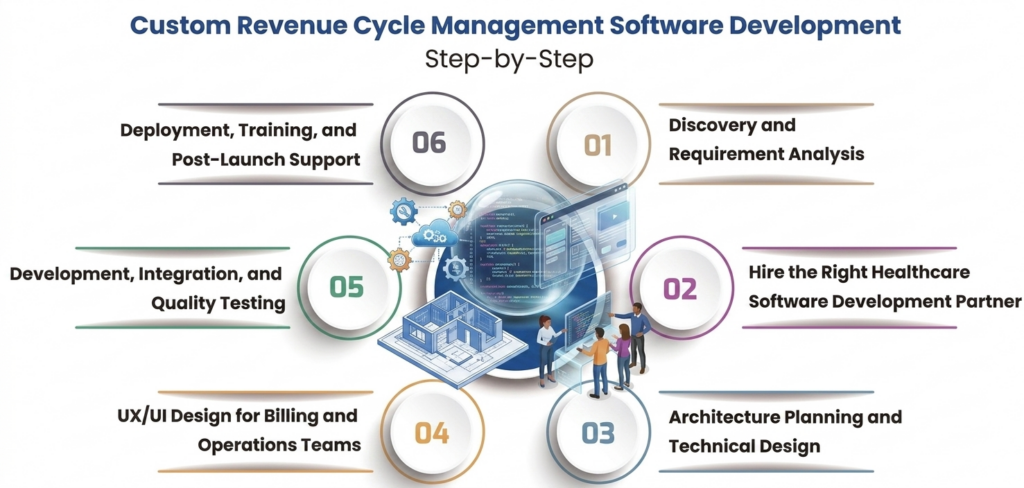
Step 1: Discovery and Requirement Analysis
Every successful RCM software project starts with understanding your business needs in detail.
At this stage, the development team works closely with your stakeholders, such as finance leaders, billing managers, operations teams, and healthcare administrators, to understand your current revenue cycle process, existing system limitations, integration needs, compliance requirements, and operational challenges.
This phase helps define exactly what the software should solve before development begins.
Step 2: Hire the Right Healthcare Software Development Partner
Once your requirements are clear, the next step is choosing an experienced custom healthcare software development company that can turn your vision into a reliable product.
This decision matters because Revenue Cycle Management software is not generic business software. It requires deep healthcare domain knowledge, a strong understanding of billing workflows, payer systems, EHR integrations, interoperability standards, and compliance regulations.
An experienced partner like DreamSoft4U can help you avoid costly mistakes, recommend the right architecture, and build a scalable RCM solution aligned with your long-term business goals.
Step 3: Architecture Planning and Technical Design
After selecting your development partner, the technical planning phase begins.
Here, the engineering team defines the software architecture, core modules, database structure, integrations, security layers, and technology stack required for the platform.
This includes planning how the system will connect with EHRs, EMRs, clearinghouses, insurance providers, payment gateways, and external healthcare systems.
A strong technical foundation prevents future scalability and performance issues.
Step 4: UX/UI Design for Billing and Operations Teams
Revenue Cycle Management software is used daily by billing teams, finance staff, and administrators, so usability is critical.
During this stage, designers create dashboards, workflows, claim management screens, billing interfaces, and reporting layouts that make complex processes easier to manage.
The goal is to create software that reduces manual effort, improves productivity, and minimizes user confusion.
Step 5: Development, Integration, and Quality Testing
Once designs are approved, actual software development begins.
The engineering team builds each module, integrates external systems, and develops automation workflows in phases. At the same time, quality assurance teams continuously test features for functionality, performance, security, and compliance.
This ensures the software works reliably before launch and prevents expensive post-deployment fixes.
Step 6: Deployment, Training, and Post-Launch Support
After successful testing, the platform is deployed into the live production environment.
The development partner helps with implementation, user onboarding, staff training, and early performance monitoring to ensure a smooth transition.
Post-launch support is equally important because healthcare billing requirements, payer rules, and compliance standards continue to evolve. Ongoing maintenance keeps your RCM platform secure, updated, and aligned with business growth.
Common Challenges in RCM Software Development (and How to Solve Them)
Here are some of the most common challenges healthcare organizations face during RCM software development and how to solve them.
1. Managing Messy Legacy Data
Many healthcare organizations still rely on older systems that store patient, billing, and payer data in inconsistent formats. This creates major integration challenges during software development because incomplete or poorly structured data can cause billing errors and workflow disruptions.
Solution: Standardize and clean legacy data early in the development process. Using interoperability standards like FHIR helps organize data properly and ensures smoother integration with modern healthcare systems.
2. Handling Complex Claim Lifecycles
Healthcare claims rarely follow a simple, straight path. A single claim may be submitted, partially approved, denied, corrected, and resubmitted multiple times before final payment. Without proper tracking, claims can easily get lost or delayed.
Solution: Build a workflow-driven claim tracking system that records every claim status update in real time. This helps teams maintain full visibility and prevents revenue leakage during claim processing.
3. Adapting to Constantly Changing Payer Rules
Insurance providers frequently update billing requirements, coding rules, reimbursement policies, and compliance standards. If your RCM software cannot adapt quickly, claims may start getting rejected due to outdated logic.
Solution: Use a flexible rules engine that allows billing teams to update payer-specific rules without major software redevelopment. This keeps the platform aligned with changing payer requirements.
4. Managing High Transaction Volumes Accurately
Large hospitals and healthcare networks process thousands of billing transactions every day. Without a strong system architecture, simultaneous transactions can create duplicate entries, payment mismatches, or inaccurate financial records.
Solution: Build the platform with scalable architecture and strong transaction control mechanisms that maintain data accuracy even under heavy operational load.
5. Resolving Complex Denial Scenarios
Not all claim denials are simple. Some involve partial payments, coordination between multiple insurers, coding disputes, or repeated appeal cycles. Basic billing systems often struggle to handle these scenarios effectively.
Solution: Develop a smart denial management workflow that categorizes denial reasons, automates follow-ups, tracks appeals, and helps billing teams recover revenue faster.
Compliance and Security Requirements You Cannot Skip
Revenue Cycle Management software handles highly sensitive patient and financial information every day. That means compliance and security cannot be treated as optional features.
Here are the key compliance and security requirements every custom RCM software platform should meet to protect sensitive healthcare data and ensure regulatory compliance:
1. HIPAA and HITECH Compliance
Healthcare organizations in the US must follow strict regulations like HIPAA and HITECH to protect Protected Health Information (PHI). These regulations define how patient data should be stored, accessed, shared, and secured to prevent unauthorized exposure or data breaches.
2. SOC 2 Type II Security Standards
If your RCM platform is cloud-based or offered as a SaaS product, strong operational security is essential. SOC 2 Type II helps demonstrate that your platform follows reliable security practices for handling sensitive business and healthcare data over time.
3. Strong Data Encryption
Patient billing and healthcare financial data constantly move between users, systems, and insurance providers. Without proper encryption, this information becomes vulnerable to interception or unauthorized access.
4. Audit Trails and Role-Based Access Control
In healthcare billing, accountability matters. Every action inside the system should be traceable, especially when dealing with financial records, patient data updates, or claim changes.
5. Data Privacy and Secure Testing Practices
Sensitive healthcare data should never be exposed unnecessarily, especially during testing, development, or analytics work. Privacy regulations also require organizations to manage data responsibly, including deletion when required.
📖 Also Read
What are Health Information Systems?How Much Does Custom RCM Software Cost?
The cost of custom Revenue Cycle Management software typically ranges from $40,000 to $700,000+, depending on the complexity of the platform, number of integrations, automation level, and advanced features like AI analytics or denial prediction. A simple solution costs much less than a fully automated enterprise-grade platform. Here’s the estimated cost of custom RCM software:
| Solution Type | Estimated Cost | What’s Included |
| Core / MVP Solution | $40,000 to $120,000 | Patient eligibility verification, medical coding, claim submission, billing workflows, EHR integration, and basic reporting |
| Mid-Level Custom Solution | $120,000 to $350,000 | AI-assisted coding, denial management, clearinghouse integration, advanced reporting, and workflow automation |
| Advanced Enterprise Solution | $350,000 to $700,000+ | Predictive analytics, automated AR follow-up, multi-location support, advanced integrations, and full revenue cycle automation |
What Increases the Development Cost?
Several factors directly affect the final project cost:
- Number of custom features and modules required
- Integration with EHR, EMR, clearinghouses, and payer systems
- AI-powered automation and analytics capabilities
- Compliance and security requirements
- Legacy system migration and data cleanup
- Scalability requirements for larger healthcare organizations
Ongoing Maintenance Costs
Development is only the initial investment. Custom RCM software also requires ongoing maintenance for security updates, compliance changes, performance improvements, and technical support.
In most cases, annual maintenance costs are around 15% to 20% of the original development cost.
Wondering What Your Custom RCM Software Will Actually Cost?
Share your requirements and get a detailed, no-obligation project estimate within 24 hours.
Request a Free Cost EstimateHow to Choose the Right RCM Software Development Partner
Choosing the right development partner is critical because the success of your RCM software depends heavily on the team building it. Looking to hire a dedicated RCM software development team?
Here are the five key factors to evaluate before making a decision:
1. Healthcare Domain Experience and Compliance Knowledge
Revenue Cycle Management software requires deep knowledge of healthcare billing workflows, coding standards, payer rules, and compliance requirements. Choose a partner with proven healthcare software experience, not just general software development expertise.
2. Strong Integration and Interoperability Expertise
Your RCM platform must connect smoothly with EHRs, EMRs, clearinghouses, insurance providers, and payment systems. A partner with hands-on experience in FHIR, HL7, EDI, and healthcare integrations can prevent costly system compatibility issues.
3. Proven Security and Compliance Standards
RCM software handles sensitive patient and financial data, so security cannot be compromised. Make sure the development partner follows strong security practices, data protection standards, and healthcare compliance requirements from day one.
4. Proven Track Record and Real Healthcare Case Studies
Experience should be backed by results, not just claims. Review healthcare case studies, client success stories, and past RCM-related projects to understand whether the partner has delivered similar solutions successfully.
5. Transparent Process and Long-Term Support
A reliable partner should offer clear communication, realistic timelines, and full visibility throughout development. Strong post-launch support is equally important to keep your platform secure, updated, and aligned with changing healthcare needs.
Why Choose DreamSoft4U for Custom RCM Software Development
Building custom RCM software requires deep healthcare expertise, not just software development skills. DreamSoft4u brings 23+ years of healthcare technology experience, helping organizations build secure, scalable, and compliance-focused healthcare solutions.
What sets us apart:
- 23+ years of healthcare expertisewith 1600+ successful software projects delivered
- Strong RCM and healthcare workflow understanding, from billing automation to claims management
- Expertise in EHR, EMR, FHIR, HL7, and EDI integrations for seamless healthcare connectivity
- HIPAA-focused secure development practices for compliance-ready software solutions
- End-to-end development support, from strategy and design to deployment and long-term maintenance
If you are planning to build custom RCM software, DreamSoft4U brings the healthcare knowledge and technical expertise needed to build it right.
See how we engineer healthcare platforms in Our Healthcare Portfolio, then connect with our experts to shape your roadmap.
Building RCM Software Requires Healthcare Expertise — Not Just Technical Skills
DreamSoft4U delivers secure, compliance-ready Revenue Cycle Management software built around your operations.
Get a Free RCM Software ConsultationConclusion
CustomRevenue Cycle Management software can be a smart investment for healthcare organizations looking to improve billing efficiency, reduce claim denials, and strengthen cash flow. While ready-made solutions may work for simpler needs, custom software offers the flexibility and scalability required for complex healthcare operations.
We hope this guide has helped you better understand the key aspects of custom RCM software, from features and development challenges to cost, compliance, and partner selection.
Now it is your turn to take the next step. If you are planning to build or upgrade an RCM platform, the right strategy and experienced development partner can make all the difference.
FAQs
The cost of custom RCM software typically ranges from $40,000 to $700,000+, depending on the platform’s complexity, integrations, automation requirements, and advanced features.
A basic custom RCM solution can take around 3 to 5 months, while a more advanced enterprise-grade platform may take 9 to 14 months, depending on project scope and integrations.
Off-the-shelf solutions are suitable for simple billing workflows and faster deployment. Custom RCM software is a better option for healthcare organizations with complex processes, custom workflows, or deeper integration needs.
Custom RCM software reduces claim denials by automating insurance verification, improving coding accuracy, validating claims before submission, and identifying billing issues early.
Yes, when developed correctly, custom RCM software can be fully HIPAA-compliant with strong security measures such as encryption, role-based access, audit trails, and secure data management.