
A customer clicks “Pay.” The payment looks successful. But what happens next?
Your system still needs to confirm the payment, update the order, handle the gateway response, prevent duplicate charges, and make sure the money reaches your business correctly. That is what payment gateway integration is really about. It connects your website or app with the payment provider and makes sure every payment moves safely from the customer to your business.
A good integration after custom software development keeps checkout simple for customers and payments easy to manage for your team. A poorly planned one can lead to failed payments, duplicate charges, security issues, and lost revenue.
In this guide, we cover everything you need to know about payment gateway integration, including types, architecture, APIs, security, implementation steps, costs, timelines, and how to choose the right provider.
By the end, you will know what approach fits your business and what it takes to build a secure and reliable payment system.
What Is Payment Gateway Integration?
Payment gateway integration means connecting your website, app, or platform to a payment provider so customers can pay online securely.
It includes the payment screen, the backend connection with the gateway, and the security measures that protect payment information. It also makes sure your payment status and order records stay updated correctly.
Taking a payment may seem simple, but confirming that the payment was completed successfully and updating the order correctly is where most of the real work happens.
5 Types of Payment Gateway Integration
Every gateway offers roughly the same five connection models. Your choice here sets your compliance burden, development budget, and checkout conversion rate in one decision. It deserves more thought than it usually gets.
| Type | Card data touches your servers | PCI scope | Checkout control | Dev effort |
|---|---|---|---|---|
| Hosted payment page | No | SAQ A | Low | Minimal |
| Embedded fields / iFrame | No | SAQ A-EP | High | Medium |
| SDK-based | No | SAQ A-EP | High | Medium |
| Direct API | Yes | SAQ D | Total | High |
| Custom self-hosted | Yes | SAQ D plus audit | Total | Very high |
Which Payment Gateway Integration Model Fits Your Business
Pick the model that matches your business constraints, not the one with the most features. This table gives you a defensible starting point.
| Business type | Recommended model | Why it works |
|---|---|---|
| Startup or MVP | Hosted page | Fastest launch, minimal compliance, lowest spend |
| eCommerce brand | Embedded fields | Branded checkout, strong conversion, contained PCI scope |
| SaaS with subscriptions | Direct API or SDK | Recurring billing, proration, dunning, retry logic |
| Marketplace or multi-vendor | Direct API | Split payments, seller onboarding, payout scheduling |
| Mobile-first product | Mobile SDK | Native wallets, biometric confirmation, one-tap checkout |
| Growing mid-market business | Embedded or SDK | Balance of control, cost, and manageable compliance |
Three rules make the decision faster:
- Speed over control: Choose a hosted page when launching this quarter matters more than owning the checkout design
- Brand over convenience: Choose embedded fields or an SDK when checkout experience drives your conversion numbers
- Logic over simplicity: Choose direct API only when split payments, custom billing, or regulated flows leave you no alternative
Payment Gateway Architecture That Holds Up in Production
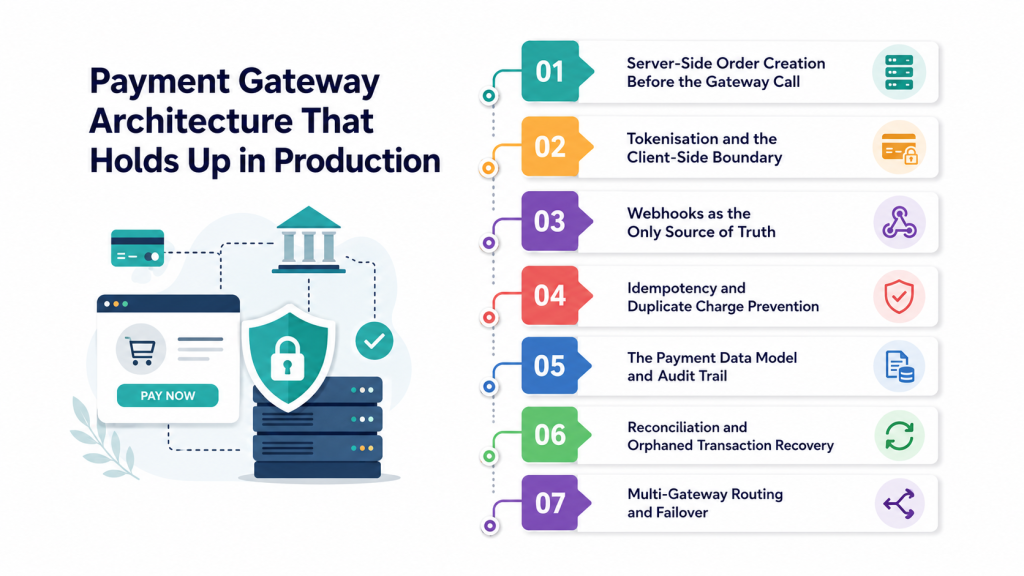
A strong payment architecture keeps transactions secure, prevents errors, and makes payments easier to manage as your business grows.
1. Server-Side Order Creation Before the Gateway Call
Create the order in your database before sending the payment request. Always use the price stored on your server, not the amount sent by the customer. This helps prevent price changes and gives you a clear record if the payment request fails or times out.
2. Tokenisation and the Client-Side Boundary
Let the payment provider collect the customer’s card details and return a secure token. Your server should use the token instead of storing or handling raw card numbers. This improves security and reduces your PCI DSS scope.
3. Webhooks as the Only Source of Truth
Do not mark an order as paid just because the customer reaches a success page. Use the payment provider’s verified webhook to confirm the payment. This keeps your order status accurate even when browsers close or connections fail.
4. Idempotency and Duplicate Charge Prevention
Use a unique idempotency key for every payment request and save each webhook event ID after processing it. This prevents the same request or event from creating duplicate charges or duplicate orders.
5. The Payment Data Model and Audit Trail
Keep clear payment records in your database, including the amount, payment status, gateway ID, failure reason, and important timestamps. Store webhook events separately so your team can review what happened if a payment issue or dispute occurs later.
6. Reconciliation and Orphaned Transaction Recovery
Regularly compare your payment records with the gateway’s records. This helps find missed webhooks, failed updates, and payments that are stuck in a pending state before they become bigger problems.
7. Multi-Gateway Routing and Failover
As your payment volume grows, consider connecting multiple gateways through one payment layer. You can route payments based on region, card type, cost, or gateway availability, helping keep payments running if one provider has an issue.
Not Sure Which Integration Model Fits Your Business?
Hosted page, embedded fields, or direct API — the right choice depends on your markets, budget, and compliance needs. Get a free 30-minute consultation with a payment integration expert.
Book Free ConsultationPayment Gateway API Integration Process: 8 Steps
Here is the sequence we follow on client builds. Work through it in order, because each step depends on decisions made in the one before it.
Step 1: Define Payment Requirements and Markets
Start by writing down what you actually need to accept, and be specific. List the countries you sell into, the currencies you will price in, and the payment methods your buyers expect in each market. Cards alone rarely cover it once you cross a border.
Then add the transaction shapes. One-time purchases behave very differently from subscriptions, and both differ from marketplace payouts or partial captures on physical goods.
Getting this on paper first saves you from the most expensive mistake in payments, which is discovering a missing requirement after the architecture is locked. A currency you forgot, or a recurring model you added late, can force a rebuild rather than an extension.
Step 2: Select the Provider and Integration Model
Choose a payment provider that supports your target markets, currencies, and payment methods. Compare pricing, settlement times, documentation, support, and sandbox reliability before making a decision.
The right integration model also depends on your business needs. A payment integration expert can help you choose between hosted pages, embedded fields, SDKs, or direct API integration while keeping cost and security in mind.
If you need help choosing the right setup, DreamSoft4u can assess your requirements and recommend a payment integration approach that fits your business, budget, and growth plans.
Step 3: Open the Merchant Account and Clear KYC
Apply for the merchant account early, because underwriting runs on the provider’s schedule, not yours. You will need business registration documents, tax identification, bank account details, owner identity proofs, and a description of what you sell.
Approval usually takes one to five business days, though newer businesses and higher-risk categories can wait longer or receive processing limits and rolling reserves.
Start this in parallel with development instead of waiting for it. Teams that treat KYC as a step rather than a background task routinely lose a week of runway to paperwork.
Step 4: Configure Credentials and the Sandbox
Once approved, collect your credentials: a publishable key for client-side code, a secret key for your backend, and a webhook signing secret. Store the secret values in a proper secrets manager rather than an environment file that ends up in version control.
Then set up the sandbox properly. Register test webhook endpoints and load the provider’s test card numbers. Confirm you can trigger a success, a decline, an expired card, and a 3DS challenge on demand.
A well-configured sandbox is the single highest-leverage hour of the whole project, because everything you test later depends on it behaving like production.
Step 5: Build the Backend Payment Layer
This is where the architecture from the previous section becomes code. Build the order creation endpoint first, with server-side pricing. Then add payment intent creation, capture, void, and refund endpoints, each with its own validation.
Next comes the webhook handler. Verify the signature and return a 200 response quickly. Push the actual work onto a background queue so a slow database write never causes a webhook timeout.
Finish with idempotency and logging. Every payment request carries a unique key, every webhook event ID gets stored, and every gateway response gets recorded in full for later investigation.
Step 6: Build the Checkout and 3DS2 Flow
On the frontend, render the gateway’s secure fields rather than your own card inputs. Add real-time validation, card type detection, proper input masking, and mobile-friendly input types so the numeric keypad appears when it should.
Then wire up 3D Secure 2. Most gateways handle the heavy lifting, but your interface still has work to do. It must route the customer through a challenge, handle a frictionless pass, and recover when authentication times out.
Keep the form short and the trust signals visible. Every field you remove, and every recognisable payment logo you show, has a measurable effect on completion.
Step 7: Test Every Failure Path, Not Just Success
A successful test payment proves almost nothing. Run the full matrix instead: declined cards, insufficient funds, expired cards, invalid numbers, network timeouts, abandoned 3DS challenges, duplicate webhook delivery, and out-of-order events.
Then test the money-back paths, which most teams forget. Full refunds, partial refunds, voided authorisations, and subscription cancellations all need to work before launch, not after your first refund request.
Finish with a manual walkthrough on real devices across major browsers. Automated suites miss rendering issues and response-shape changes that a human notices in twenty minutes.
Step 8: Go Live, Monitor and Optimise
Switch to production credentials and point webhooks at live URLs. Then run one small real transaction end to end: charge, webhook, order marked paid, refund, refund webhook. Only then open the gates.
Consider a soft launch to a slice of traffic first. Watching real behaviour on 5% of orders surfaces problems while they are still inexpensive to fix.
After launch, monitor authorisation rate, decline codes, webhook queue depth, refund cycle time, and chargeback ratio. These numbers tell you where revenue leaks, and they improve only when someone owns them.
Payment Gateway Integration Cost and Timeline
Budgets go wrong in payments because teams price the build and forget everything that follows it. The numbers below cover both.
| Cost category | What it covers | Typical range |
|---|---|---|
| Development | Frontend, backend, webhooks, testing | $4,000 to $120,000 one-time |
| PCI compliance | Self-assessment, scans, audits | $0 to $50,000 annually |
| Security infrastructure | TLS, WAF, monitoring, penetration testing | $1,000 to $60,000 annually |
| Transaction fees | Rate plus fixed fee per charge | 1.5% to 3.5% plus $0.05 to $0.49 |
| Gateway fees | Monthly access charges, provider-dependent | $0 to $50 monthly |
| Cross-border | Foreign cards, currency conversion | Additional 1% to 5% |
| Disputes | Chargeback handling fees | $15 to $25 per case |
| Fraud tooling | Risk scoring and detection platforms | $0.05 per transaction to $5,000 monthly |
Hidden Costs Most Budgets Miss
- Refund fees: Refunded payments may not return the original processing fee, increasing the cost of each refund.
- Payment retries: Retry services can add ongoing costs, especially for subscription businesses.
- Account updates: Account updater services may charge extra to keep saved card details updated.
- Premium support: Faster or dedicated gateway support may come with additional fees.
- Technical maintenance: API updates, security fixes, and gateway changes require ongoing development work.
- Engineering time: Regular maintenance takes developer time away from your product roadmap
How Long Payment Gateway Integration Takes
| Phase | Hosted page | Embedded or SDK | Direct API |
|---|---|---|---|
| Requirements and provider selection | 2 to 3 days | 1 week | 1 to 2 weeks |
| Merchant account and KYC | 1 to 5 days | 1 to 5 days | 1 to 2 weeks |
| Build | 2 to 5 days | 2 to 4 weeks | 5 to 12 weeks |
| Testing | 1 to 2 days | 1 week | 2 to 4 weeks |
| Go-live and stabilisation | 1 day | 3 to 5 days | 1 to 2 weeks |
Payment Gateway Integration by Industry
Payment requirements can vary by industry. The basic technology stays similar, but the payment flows and features you need can be very different.
1. eCommerce and Retail
eCommerce businessess need a fast and simple checkout to improve conversions. Guest checkout, saved cards, digital wallets, delayed capture, multiple currencies, and local payment methods can make the payment experience easier for customers.
2. SaaS and Subscription Platforms
SaaS businesses need payment systems that can handle subscriptions, trials, upgrades, downgrades, prorated charges, retries, and failed payments. Features such as card updates and network tokens can also help prevent customers from being lost when their cards expire.
3. Marketplaces and Multi-Vendor Platforms
Marketplaces need more complex payment flows, including seller onboarding, payment splitting, verification, balances, and scheduled payouts. Direct API integration is often a better fit because it gives businesses more control over how money moves between customers, sellers, and the platform.
4. Healthcare and Patient Billing
Healthcare payment systems need to protect payment information while keeping it separate from sensitive patient data. They may also need to support insurance adjustments, partial payments, payment plans, and other billing workflows that require a more specialised approach.
5. Logistics, Travel and On-Demand Services
These businesses may need to authorise a payment before a service and capture it later, sometimes for a different amount. Partial payments, changing charges, partner payouts, and failed payment recovery are important because the service may already have been provided when a payment issue occurs.
Now that you have seen how requirements shift across industries, let’s look at the problems that surface in almost every payment build.
7 Common Payment Gateway Integration Challenges and How to Solve Them
Payment systems can face issues even when the basic integration works correctly. Here are the most common challenges and simple ways to handle them.
Challenge 1: Soft Declines vs Hard Declines
A soft decline is usually temporary, such as insufficient funds or a temporary bank or fraud check. A hard decline is more permanent, such as an invalid or closed card. Treating both types the same can lead to lost sales or unnecessary retries.
Solution: Retry soft declines after a suitable delay, but avoid repeatedly retrying hard declines. Use clear decline codes from the payment provider to decide when a payment can be tried again.
Challenge 2: Network Timeouts and Retry Logic
Sometimes the payment gateway does not respond even though the payment may have gone through. Retrying immediately can create a duplicate charge.
Solution: Check the payment status before retrying and use the same idempotency key. Add short delays between retries to avoid sending multiple requests at once.
Challenge 3: Webhook Failures, Duplicates and Replay Attacks
Payment webhooks can arrive late, more than once, or in the wrong order. Fake or outdated webhook requests can also create security risks.
Solution: Verify every webhook signature and check that the event is recent. Store processed event IDs so the same webhook is not handled twice.
Challenge 4: Multi-Currency Settlement and Foreign Exchange
Accepting multiple currencies can increase conversion fees and make payment reconciliation more complicated. Currency exchange rates can also affect the final amount your business receives.
Solution: Decide which currencies you will support and how you will handle conversion costs. Using local currency accounts in key markets can help reduce unnecessary conversion fees.
Challenge 5: Checkout Friction and Cart Abandonment
A complicated checkout can make customers leave before completing their purchase. Too many fields, unexpected costs, and limited payment options can all hurt conversions.
Solution: Keep the checkout short and simple. Offer guest checkout, digital wallets, mobile-friendly forms, and clear pricing before the customer reaches the final payment step.
Challenge 6: Fraud, Chargebacks and Dispute Handling
Fraud and chargebacks can lead to lost revenue, additional fees, and problems with your payment provider. Poor billing information can also cause customers to dispute genuine transactions.
Solution: Use fraud checks, clear billing descriptors, and payment monitoring to reduce unnecessary disputes. When a genuine dispute occurs, provide evidence such as delivery records, customer communication, and transaction details.
Challenge 7: Mobile Payment and Wallet Optimisation
Customers expect payments to be quick and easy on mobile devices. Small buttons, difficult forms, or manual card entry can cause customers to abandon checkout.
Solution: Use mobile-friendly payment fields, simple forms, and digital wallets such as Apple Pay and Google Pay. These options reduce manual data entry and make mobile checkout faster.
Why Trust DreamSoft4U for Payment Gateway Integration
When payments are critical to your business, you need more than a basic API connection. You need a payment system that works reliably, protects customer data, and keeps transactions moving as your business grows.
With 22+ years of engineering experience and 1,600+ projects delivered, DreamSoft4u helps businesses build and integrate secure, reliable payment solutions across the US, India, the UK, Europe, the Middle East, and Australia.
Why choose us?
- Engineering-led delivery: 100+ engineers building production-grade payment layers, not configured plugins
- Secure-by-design architecture: PCI-aligned integrations that keep card data off your servers and your compliance scope small
- End-to-end ownership: Requirements, provider selection, architecture, build, testing, go-live, and post-launch monitoring under one team
- Domain-deep across verticals: Commerce, subscriptions, marketplaces, fintech products, and regulated healthcare billing.
- ROI-driven engagement models: Fixed scope, dedicated team, or staff augmentation, matched to how you want to work
Build a Payment System That’s Secure and Built for Growth
22+ years of engineering experience, 1,600+ projects delivered. Let our team plan, build, test, and launch your payment gateway integration end to end.
Get Your Free Integration Plan ↗Conclusion
Payment gateway integration is more than connecting a payment button to an API. You need the right integration model, secure architecture, reliable payment tracking, and proper handling of failures, refunds, and fraud.
Start by understanding your business needs, markets, payment methods, and budget. Then choose a provider and integration approach that gives you the right balance of security, control, cost, and scalability.
A well-planned payment system can make checkout easier for customers, reduce payment issues, and support your business as it grows.
If you need help choosing or building the right payment gateway integration, contact us, and we’ll help you plan, develop, test, and launch a secure payment solution tailored to your business.
Frequently Asked Questions
A hosted payment gateway integration can go live in under two weeks, including account approval. Embedded fields and SDK builds usually take four to seven weeks. Direct API integrations with subscriptions or split payments typically run eight to twenty weeks, including testing.
Development ranges from roughly $4,000 for a hosted setup to $120,000 or more for a full custom API build. Add annual compliance costs, security infrastructure, and per-transaction processing fees, which usually sit between 1.5% and 3.5% plus a fixed amount.
Startups and MVPs get the most value from hosted pages. eCommerce brands generally do best with embedded fields, mobile-first products with native SDKs, and marketplaces or subscription platforms with direct API integration.
Yes, though your scope depends entirely on your integration method. Hosted pages usually qualify for the lowest assessment tier, while embedded and SDK integrations sit in the middle. Direct API integrations where your servers touch card data carry the heaviest requirements.
A gateway captures and securely transmits payment details from your checkout. A processor moves the transaction through card networks and banks to actually settle funds. Many providers bundle both, but they perform different jobs when you are debugging a failure.