






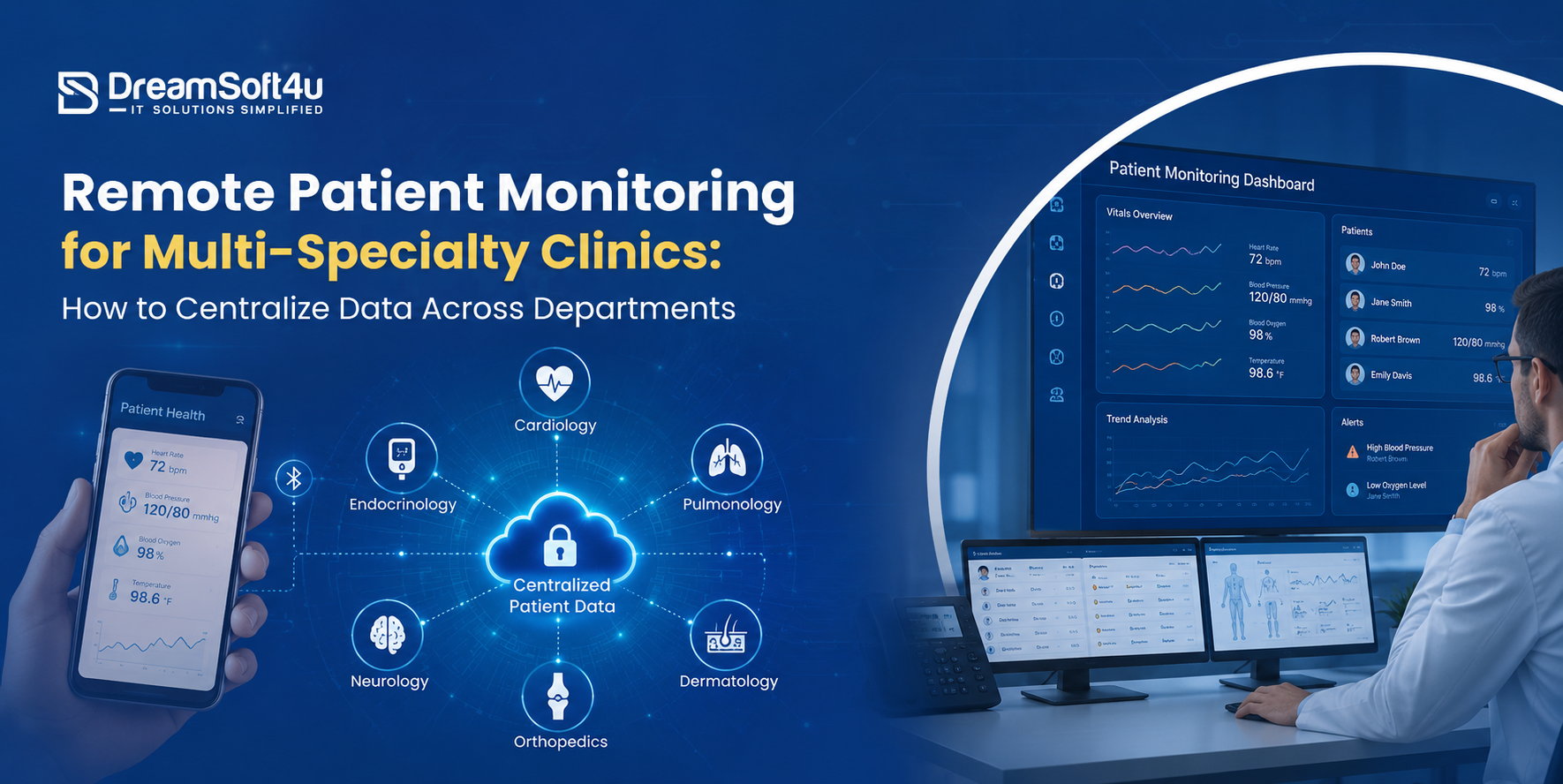
As clinics expand across multiple specialties, patient data often becomes fragmented. A cardiologist may see blood pressure trends, an endocrinologist may review glucose readings, and a primary care physician may only have part of the story. This lack of visibility can lead to delayed decisions, duplicated efforts, and gaps in patient care.
That is why choosing the right RPM software for clinics is about more than collecting remote patient data. It is about bringing every reading, from every device and every department, into a single, trusted patient record.
In this guide, you’ll learn how to centralize multi-specialty patient data, overcome common integration challenges, and choose an RPM platform that supports connected, coordinated care across your entire clinic.
What RPM Software for Clinics Does and Why Multi-Specialty Practices Need It?
RPM software for clinics helps healthcare providers track patients’ health from home using connected devices.
These devices collect important health data such as blood pressure, blood sugar, weight, heart rate, and oxygen levels, then send it to doctors and care teams.
This allows providers to keep an eye on patients between appointments, spot health issues earlier, and take action before problems become serious.
For a clinic with only one specialty, managing this data is usually simple. But in a multi-specialty clinic, different departments need different types of patient information.
As more patients use connected health devices, the amount of data continues to grow. If each department uses a different system, patient information can become scattered and difficult to access.
That is why RPM software for clinics is so important. It brings data from different devices and departments into one place, creating a complete view of the patient’s health. This helps doctors work together more effectively, make better decisions, and provide better patient care.
Why Patient Data Gets Trapped in Departmental Silos
Most clinics do not set out to fragment their data, yet it happens one tool at a time. Here are the five reasons RPM software for clinics so often ends up siloed across departments.
1. Separate Vendor Portals for Each Specialty
Cardiology signs up for one vendor, endocrinology picks another, and billing runs somewhere else. Each tool works on its own, but none of them share a record, so your patient data splits the moment it arrives.
2. Readings That Never Reach the EHR
Your monitors capture vitals every day, yet many of them land in a portal your physicians rarely open. When that data never flows into the chart, your clinicians end up making decisions on half the picture.
3. Incompatible Data Formats and Missing Standards
Different devices speak different languages, and without HL7 or FHIR, they never line up cleanly. In fact, fewer than 45% of connected medical devices integrate cleanly with EHR systems, according to ONC.
4. Manual Data Entry Between Systems
When your tools do not connect, staff re-key readings by hand from one screen to another. That wastes clinical time and quietly introduces the errors that fragmented records are known for.
5. Legacy Systems That Resist Integration
Many clinics still run older platforms that were never built to share data outward. Weak RPM EHR integration keeps that history locked away and blocks the analytics and reporting you need to improve care.
Also Read: FHIR HL7 and the Future of Healthcare Interoperability
How to Centralize RPM Data Across Departments: A Step-by-Step Framework
Follow these seven steps in order, and your RPM software for clinics will read from one shared record that every department trusts:
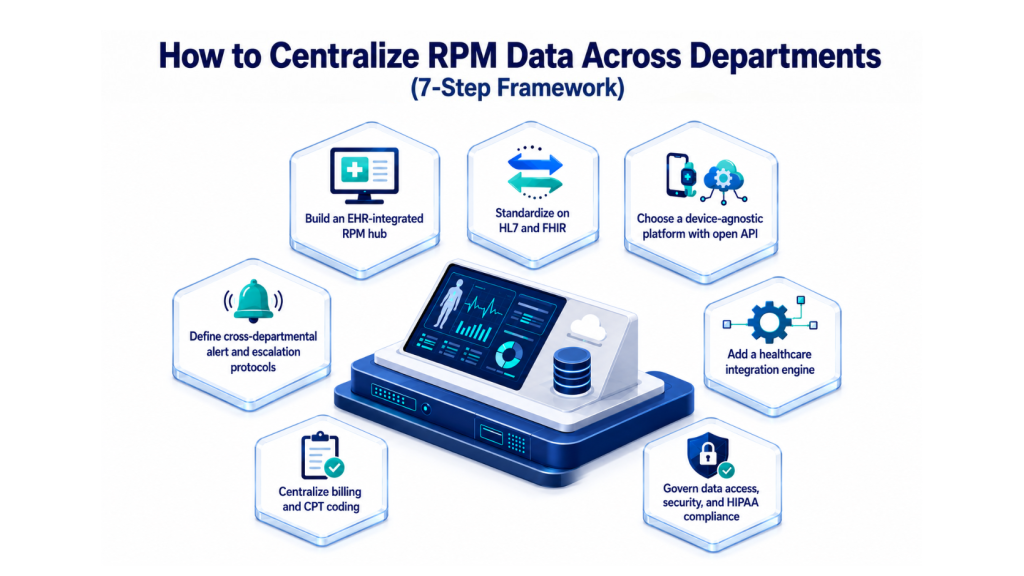
Step 1. Build an EHR-Integrated RPM Hub, Not Siloed Vendor Portals
Start by making your primary EHR the single home for monitoring data. Instead of a separate portal for each specialty, choose a platform that pushes readings straight into systems like Epic, Cerner, or eClinicalWorks.
When data lands inside the chart your clinicians already use, nobody logs into a second tool to see a vital. Our work on Epic EMR and EHR integration shows how that connection is built. A SaaS-based EMR and EHR keeps one continuous workflow across every department.
Step 2. Standardize on HL7 and FHIR for True Interoperability
Next, agree on a common language for your data. HL7 and FHIR interoperability standards let different devices and systems exchange readings without custom rework for each one.
FHIR in particular uses modern web formats, so a glucose value from one vendor reads the same as a blood pressure value from another. Our plain-English guide to HL7 and FHIR explains why this matters for clinical data.
Step 3. Choose a Device-Agnostic Platform with an Open API
Different specialties depend on different hardware, so your software must stay open to all of it. Pick a platform built on an open API that accepts data from many device makers, not just one brand.
Cardiology might add Bluetooth blood pressure cuffs and ECG patches, while endocrinology connects continuous glucose monitors. With strong connected medical device integration, every reading flows into the same record, no matter who made the device.
Step 4. Add a Healthcare Integration Engine for Disparate Systems
If your departments run different software, a central integration engine becomes your translator. Tools like Mirth Connect or similar engines normalize incoming streams into one readable format that your EHR can store.
The engine sits between your sources and your record, cleaning and routing data as it arrives. We build and maintain these connections through our HL7 interface and integration work, so legacy and modern systems finally speak to each other.
Step 5. Define Cross-Departmental Alert and Escalation Protocols
Centralized data only helps if the right person sees the right warning. Set clinical escalation rules so out-of-range vitals route to the correct specialty on their own.
A blood pressure reading above 140/90 mmHg can flow straight to the cardiology dashboard, while a glucose reading over 250 mg/dL alerts the endocrinology team. Decide the thresholds, the owner, and the response time for each alert before launch.
Step 6. Centralize Billing and CPT Coding Across Specialties
Reimbursement falls apart when each department tracks time its own way. Configure your platform to log the clinical minutes that RPM CPT codes require, including 99453, 99454, 99457, and 99458.
When billing runs from the same hub as your clinical data, every team captures reimbursement consistently, and audits stay clean. Review the current CMS fee schedule so your coding always matches the latest RPM billing requirements.
Step 7. Govern Data Access, Security, and HIPAA Compliance
Finally, protect the record you have unified. Build HIPAA-compliant access controls so each role sees only what it should, backed by encryption in transit and at rest.
Role-based permissions, multi-factor authentication, and audit logs keep patient data secure across every department. The HIPAA Journal reports that over 80% of organizations faced a connected-device security incident, so these guardrails matter. Strong RPM software for clinics treats compliance as a foundation, not an afterthought.
Now you have seen how to centralize the data flow, so let’s look at what separates strong RPM software for clinics from the rest.
Ready to Centralize Your RPM Data?
Use our proven framework to connect every specialty, device, and department into one EHR-integrated hub.
What to Look for in RPM Software for Clinics
A quick way to see the difference is to compare a siloed setup against a centralized one. The table below shows what changes when every department works from one platform.
| Factor | Siloed Vendor Portals | Centralized RPM Platform |
|---|---|---|
| Patient view | Partial, split across tools | One shared timeline for all teams |
| Data format | Inconsistent per vendor | Normalized through HL7 and FHIR |
| Device support | Locked to one brand | Open API across specialties |
| Alerts | Manual, often missed | Auto-routed to the right department |
| Billing | Tracked separately, gaps appear | Unified, audit-ready capture |
| Scaling | Breaks as you add specialties | Grows with the practice |
When you evaluate platforms, the feature list matters less than how well everything connects. These are the capabilities that decide whether your RPM software for clinics can truly centralize patient data across departments.
1. EHR Integration via HL7 and FHIR
This is the capability that makes every other one work. Confirm that readings sync straight into your chart through HL7 and FHIR, not into a side portal your team has to check separately.
2. Open API and Broad Device Support
Your specialties will never all use the same hardware, so the platform has to stay open. Check that it accepts data from many device makers through an open API, so you are never locked to one brand.
3. Configurable, Role-Based Dashboards
Each department wants its own vitals up front without losing the shared record underneath. Look for dashboards your teams can tailor by role, so every specialty gets a relevant view of the same data.
4. Customizable Alerts and Escalation
An alert only helps if it reaches the right person fast. Make sure you can set thresholds that route out-of-range vitals to the correct team automatically, each with a clear owner attached.
5. Automated Time Tracking and CPT Billing
Reimbursement should not depend on someone remembering to log minutes. Verify that the platform tracks clinical time and captures your RPM CPT codes for you, so billing stays accurate across every team.
6. Analytics and Reporting
Raw numbers are not the same as insight. Choose software that surfaces trends at both the patient and program level, so you can see who needs attention and prove your program’s value.
7. Security and Compliance
In healthcare, this one is non-negotiable. Require HIPAA-grade encryption, full audit logs, and granular access controls as standard, so your centralized record stays protected and defensible.
Picking the right RPM software for clinics comes down to one test. Does every reading end up on a record that all of your departments can act on? Our guide on custom healthcare software development helps if you are weighing a tailored build.
Also Read: Things to Keep in Mind While Developing Custom Healthcare Software
What Each Specialty Needs from One Centralized Platform
Centralization does not mean every department tracks the same patient data. Each specialty continues to monitor the vitals that matter most to them, but all data is stored in one shared patient record.
This gives every provider a complete view of the patient’s health and helps teams work together more effectively.
| Specialty | Key Vitals Tracked | Common Devices | Sample Alert Trigger |
|---|---|---|---|
| Cardiology | Blood pressure, heart rate, ECG | BP cuff, ECG patch | BP above 140/90 mmHg |
| Endocrinology | Blood glucose, weight | Continuous glucose monitor | Glucose over 250 mg/dL |
| Pulmonology | Oxygen saturation, lung function | Pulse oximeter, spirometer | SpO2 below 90% |
| Nephrology | Weight, blood pressure, fluid balance | Connected scale, BP cuff | Rapid weight gain over a set limit |
| Primary care | Multiple chronic vitals | Mixed device set | Any reading outside the care plan |
Now that you have seen what each department needs, let’s look at the mistakes that quietly undo a centralization effort.
Also Read: Difference Between Telemedicine and Telehealth
Mistakes to Avoid When Centralizing RPM Data
Many clinics invest in RPM technology but still struggle to centralize patient data effectively. Here are five common mistakes and how to avoid them.
Mistake 1: Choosing Siloed Vendor Portals
Using different RPM platforms for different specialties creates separate data silos and fragmented patient records. As a result, providers cannot see a complete view of the patient’s health.
Solution: Choose a centralized RPM platform that connects all specialties and stores patient data in one shared record.
Mistake 2: Ignoring Interoperability Standards
Without standards like HL7 and FHIR, devices and systems cannot easily exchange data. This often leads to integration challenges and costly custom development.
Solution: Select RPM software that supports HL7 and FHIR standards to ensure smooth data sharing across systems.
Mistake 3: Not Defining Alert Ownership
When no one is responsible for responding to alerts, critical patient warnings can be missed or delayed.
Solution: Assign clear ownership, escalation paths, and response times for every alert type before launching your RPM program.
Mistake 4: Relying on Manual Data Entry
Manually moving patient data between systems is time-consuming and increases the risk of errors.
Solution: Automate data syncing between devices, RPM software, and EHR systems to improve accuracy and save staff time.
Mistake 5: Treating Compliance as an Afterthought
Adding security and compliance measures at the end can leave gaps that put patient data at risk.
Solution: Build HIPAA-compliant security, encryption, access controls, and audit logs into the system from the beginning.
Don’t Let These Mistakes Cost You Patients and Revenue
Our RPM experts have helped 1,000+ clinics avoid these exact pitfalls. Let us build the right setup for yours.
Why DreamSoft4U for Centralized RPM Software
DreamSoft4U engineers compliance-grade, interoperable healthcare platforms that bring every department onto one record. With over two decades of work and 1,600+ projects delivered, our teams across the US and India build RPM systems that scale.
Here is what sets our work apart:
- 100+ engineers who know EMR, EHR, PHR, and clinical workflows, not just code.
- HL7, FHIR, and DICOM integration so your data moves cleanly across systems.
- HIPAA, GDPR, and ISO 27001 aligned engineering for healthcare brands worldwide.
- 1,000+ satisfied customers and a 98% client retention rate on long-term work.
- We engineer, integrate, and maintain your RPM software for clinics from first build to ongoing support.
Conclusion
Centralizing Remote Patient Monitoring data across a multi-specialty clinic comes down to one principle. Every reading, from every device, in every department, should land on a single shared record. Get the hub, the standards, the open APIs, the alert rules, and the billing right, and your teams work from one source of truth.
We hope this guide helped you understand how the right RPM software for clinics turns scattered data into coordinated care. Now it is your turn to put the framework to work in your own practice.
See What a Compliance-Grade RPM Platform Looks Like
Get a walkthrough of how DreamSoft4U builds centralized, multi-specialty RPM systems from first build to ongoing support.
FAQs
1. What is RPM software for clinics?
It is a platform that collects patient vitals from connected devices and delivers them to your care teams in near real time. For multi-specialty practices, the right system centralizes every reading onto one shared, EHR-integrated record.
2. How does RPM software centralize data across departments?
RPM software for clinics pushes readings from every device into one EHR-integrated hub instead of separate vendor portals. With HL7 and FHIR interoperability and an open API, cardiology, endocrinology, and primary care all read the same data.
3. Which RPM CPT codes should a clinic track?
The core RPM CPT codes are 99453 and 99454 for setup and device supply, plus 99457 and 99458 for clinical monitoring time. Centralized billing logs this time automatically, so every department captures reimbursement.
4. Does RPM software integrate with our existing EHR?
Yes, strong platforms integrate with systems like Epic, Cerner, and eClinicalWorks through HL7 and FHIR standards. Solid RPM EHR integration keeps readings inside the chart your clinicians already use.
5. How long does it take to roll out centralized RPM software?
Timelines vary with your systems and number of specialties, though a focused rollout often takes a few months. Building RPM software for clinics on interoperability standards and an integration engine shortens the work considerably.
6. Is RPM software for clinics HIPAA-compliant?
It should be by design. Look for HIPAA-compliant encryption, role-based access controls, multi-factor authentication, and full audit logs as standard features before you commit.
7. Can one platform support many specialties at once?
Yes, that is the point of centralization. A device-agnostic platform with connected medical device integration lets each specialty track its own vitals while feeding one shared patient record.
8. Should we build custom RPM software or buy a platform?
It depends on how unique your workflows and integrations are. A custom build gives you full control over centralization, while a configurable platform launches faster, so weigh both against your roadmap.