







Data costs are rising faster than ever, and for many organizations, the problem is not the amount of data they store. It is the way their data pipeline architecture is designed.
Inefficient pipelines can quietly increase storage, compute, and data movement costs, turning what should be a scalable system into an expensive one. The challenge is that these costs often remain hidden until they start affecting budgets and business decisions.
The good news is that a few strategic architecture changes can significantly reduce costs without sacrificing performance or reliability.
In this guide, you’ll learn where data pipeline costs originate, why they increase over time, and the most effective ways to optimize your architecture for long-term efficiency and growth.
Quick-Answer Summary: Where Data Pipeline Costs Hide and How to Cut Them
Most teams optimize one zone of their pipeline and stay surprised when the bill keeps climbing anyway.
The table below maps the three zones where the data pipeline actually lives, the share each one takes, and the realistic saving you can expect when you attack it correctly.
| Cost Zone | What It Covers | Typical Share of Spend | Realistic Saving When Optimized |
|---|---|---|---|
| Storage | Warehouse, data lake, vector, and cache storage | 20% to 30% | 5% to 8% |
| Compute | ETL/ELT jobs, queries, AI and embedding workloads | 50% to 65% | 25% to 40% |
| Movement | Egress, cross-region replication, integration tool fees | 10% to 25% | 20% to 40% of movement spend |
| Whole pipeline (first-time optimization) | All three zones, attacked in the right order | 100% | 30% to 50% in one quarter |
The single most important takeaway is that computers hold most of the money, so you should optimize it before you ever touch storage.
Teams that begin with storage tend to save very little, while teams that begin with computers genuinely change the shape of the bill.
Is Your Data Pipeline Architecture Costing You More Than It Should?
Most teams overspend not because of data volume – but because of poor pipeline design. We find exactly where your money is leaking.
What Is Data Pipeline Architecture (and Why It Impacts Costs)
Data pipeline architecture is the way data moves from one system to another. It defines how data is collected, processed, and stored before it is used for reporting, data analytics services, or business decisions.
Most data pipeline development projects follow three steps. First, data is collected from sources such as databases, applications, APIs, and files. Next, the data is cleaned and organized. Finally, it is stored in a data warehouse, data lake, or database for future use.
The design of your data engineering services and data pipeline has a direct impact on costs. It affects how much data you store, how much processing power you use, and how often data moves between systems. A well-designed pipeline helps reduce waste, improve performance, and keep costs under control through cloud cost optimization.
Why Data Pipeline Costs Spiral Out of Control?
Understanding these five patterns below tells you where to point your attention well before the next invoice lands:
1. Pipelines Multiply Faster Than Anyone Owns the Spend
Here is the pattern you will recognize instantly. Every team that needs data builds its own pipeline, and each one triggers downstream jobs that feed still more teams. Within a year you can end up with hundreds of overlapping flows and not one person accountable for the total. This ownership gap sits at the root of most runaway data bills, and it is organizational long before it ever becomes technical.
2. Compute Is Billed at Peak, Not at Average
Think about how your streaming jobs and always-on clusters get sized. They are provisioned for peak load, then paid for around the clock even while they sit idle most of the day. In effect, you fund the single busiest minute for all of the quiet ones too. That mismatch between peak sizing and average usage quietly becomes one of the largest sources of waste in any compute-heavy pipeline you run.
3. Movement Costs Hide Across a Dozen Line Items
This is the zone that slips past almost every cost review you hold. Data movement rarely shows up as one big charge, and instead scatters itself across egress fees, cross-region replication, integration subscriptions, and reverse ETL tooling. Because each line looks modest on its own, nobody flags it. Add them all together, though, and movement frequently reaches a full quarter of your total data spend.
4. AI and Embedding Workloads Run on Full Datasets
You are probably feeling this one most in 2026. Embedding generation and AI enrichment now get applied across entire datasets even when only a fraction is ever queried. At small scale this barely registers, yet at a million-document scale the compute and vector storage together become a serious line item. It has become the fastest-growing cost on the computer side, and most teams have not split it out yet.
5. Stale, Duplicated Data Inflates Storage Silently
This is the slow leak you never quite notice. Old data nobody queries keeps sitting in expensive hot storage, while the same datasets get copied into several team-owned tables at once. You end up paying premium rates to store information untouched in months. Without retention policies and shared models to keep things tidy, your storage grows on autopilot and the bill quietly follows it upward.
10 Ways to Reduce Data Storage and Pipeline Costs with Better Architecture
Here are top ten ways to reduce data storage and pipeline costs with better architecture:
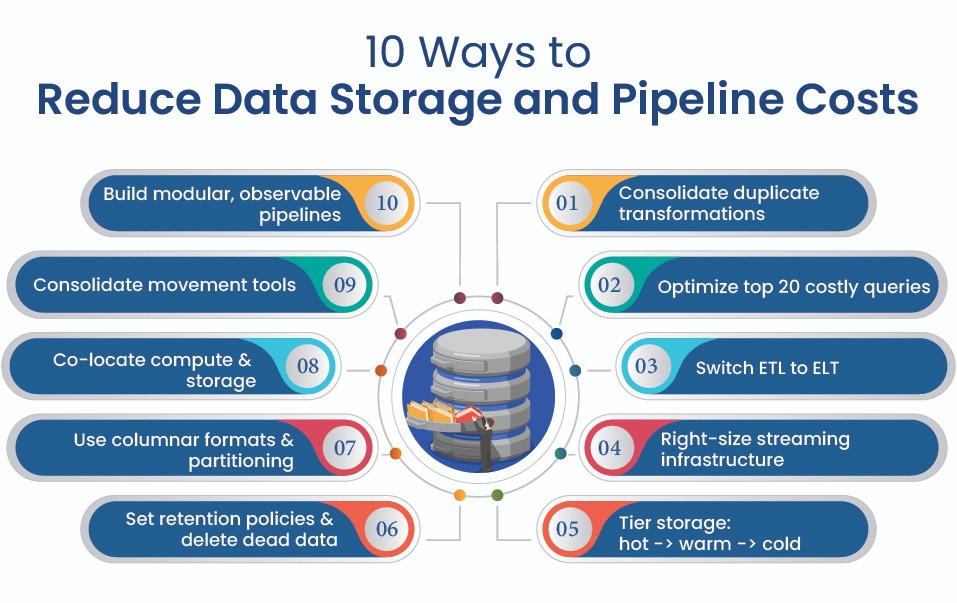
1. Consolidate Duplicated Transformations into Shared Models
This is the highest-return move you have, so start here. The same business logic often runs many times because no team fully trusts another team’s output, so marketing, finance, and sales each compute their own customer table from raw events. That means you pay for identical work three separate times. Consolidating it into shared, governed models is more political than technical, yet the saving usually lands between 15% and 30% of compute spend.
2. Optimize Your Top 20 Highest-Cost Queries
A surprisingly small set of queries usually drives most of your computer bill. The top 20 queries by cost often account for 60% to 80% of total compute, and most warehouses hand you that ranking in their cost dashboard. Rewrite the worst offenders so they scan less data, prune needless joins, and cache repeated calculations. This focused pass commonly returns another 10% to 20% of computer spend.
3. Move from ETL to ELT Where the Warehouse Is Cheaper
Traditional ETL transforms your data in a separate processing layer before it ever gets loaded.Modern cloud warehouses, however, are now powerful enough for many cloud migration services initiativesthat transforming inside the warehouse with ELT is frequently faster and cheaper for you. Shifting that work into the destination removes an entire external compute layer while preserving raw data for reprocessing. Make the switch wherever your warehouse offers strong transformation and you can drop the standalone tier.
4. Right-Size Always-On Streaming Infrastructure
Your streaming and real-time materialization run continuously, which means you are billed at peak capacity through long idle stretches. Begin by reviewing which workloads genuinely need sub-second freshness, then move everything else onto scheduled batch runs. Reserve streaming only for the cases where a delay of minutes would actually destroy the value, such as fraud detection. Matching freshness to real need cuts a large slice of always-on waste.
5. Tier Storage with Hot, Warm, and Cold Layers
Not all of your data deserves premium storage, so stop paying as if it does. Keep frequently queried data in hot storage, shift older data down to warm tiers, and archive rarely touched records into cold object storage. Cloud platforms price these tiers very differently, which means moving aging data down the ladder trims cost without losing access. Automate the tiering by data age so the savings keep compounding month after month.
6. Apply Retention Policies and Delete Dead Data
Most warehouses quietly hoard data you will never query again. Set explicit retention rules that archive or delete records past their useful life, while balancing that against any compliance requirement to keep them. Storing history forever inflates your bill, yet deleting too early can destroy analysis you still need, so the policy has to be deliberate. A clear, automated policy stops storage from growing on autopilot.
7. Use Columnar Formats, Compression, and Partitioning
How you choose to store data dictates how much computation every single query burns for you. Columnar formats let queries scan only the columns they need, compression shrinks the bytes on disk, and partitioning lets the engine skip irrelevant data entirely. Taken together, these three reduce both your storage footprint and the per-query scan cost that quietly drives computers. Think of it as foundational housekeeping that pays you back everywhere.
8. Co-Locate Compute and Storage to Kill Egress Charges
Cross-region data movement is one of the sneakiest cost lines you face, since egress fees apply every time data crosses a boundary. The fix is to place your heaviest workloads in the same region as their storage so data never has to travel and trigger those charges. For high-volume pipelines, this single change can wipe out an entire category of fees. It is essentially a one-time decision that keeps paying you back on every run.
9. Consolidate Overlapping Movement and Integration Tools
Many teams run several integration tools side by side, each handling similar jobs and each charging its own fee. Start by auditing your connectors, CDC tools, and reverse ETL platforms, then consolidate down to the smallest set that still covers your needs. From there, treat egress and integration fees as a first-class cost line instead of a rounding error. A leaner toolset reclaims a real share of your most overlooked zone.
10. Build Modular, Observable Pipelines That Fail Cheap
Monolithic pipelines fail expensively on you, because one broken stage can force a full rerun from scratch. Instead, design transformation logic as discrete, reusable components with clear inputs and outputs so each stage can scale, fail, and recover on its own. Pair that modularity with observability tracking volume, latency, and cost at every step. A modular, monitored pipeline catches problems early and reruns only the broken part.
Want to Reduce Data Storage Costs Without Slowing Your Team?
You know the tactics. We handle the execution – query rewrites, storage tiering, pipeline consolidation – end to end.
Build vs Buy: Custom Pipeline vs SaaS
Choosing between a custom pipeline and a SaaS solution is an important decision because it affects both costs and long-term scalability. The best option depends on your data volume, business requirements, budget, and the level of control you need.
1. Building a Custom Pipeline
A custom pipeline gives you complete control over your data workflows and infrastructure. While it requires more time, technical expertise, and ongoing maintenance, it can be more cost-effective for organizations with large data volumes, unique requirements, or strict compliance needs.
2. Buying a SaaS Solution
A SaaS Software solution is quick to deploy and easy to manage because the vendor handles most of the maintenance and updates. It is a good choice for teams that want faster implementation and lower operational overhead, though costs may increase as data volumes grow.
Which Option Is Right for You?
A custom pipeline is ideal when flexibility, control, and scalability are priorities, while a SaaS solution works best when speed and simplicity matter most. Many organizations use a mix of both to balance cost, performance, and ease of management.
Also Read: How to Choose the Right AI Development Company for Healthcare Business
Common Tools and Example Tech Stacks
The tools you choose for data pipeline development should match your data volume, performance needs, and budget. Below are the most common technologies used in modern data pipelines.
1. Storage and Warehousing Platforms
Tools like Snowflake, BigQuery, Redshift, and Databricks store and analyze large amounts of data. They separate storage from compute, making it easier to scale resources and manage costs.
2. Object Storage and Data Lakes
Platforms such as Amazon S3 provide a low-cost way to store raw and unstructured data. They are ideal for archiving, AI training data, and datasets that are accessed less frequently.
3. Ingestion and Movement Tools
Tools like Fivetran, Airbyte, Kafka, and Debezium help move data between systems. Choosing the right tool can reduce complexity and prevent unnecessary data movement costs.
4. Transformation Engines
Solutions such as dbt, Coalesce, and SQLMesh transform raw data into business-ready datasets. They help centralize data logic and reduce duplicate processing.
5. Orchestration Layer
Apache Airflow is commonly used to schedule and manage data workflows. It helps automate tasks, monitor pipelines, and reduce failures that lead to wasted compute costs.
6. Example Stacks by Use Case
A typical batch processing stack may include Fivetran, dbt, Snowflake, and Airflow. For real-time analytics, organizations often use Kafka with a cloud data warehouse. Many businesses adopt a hybrid approach to support both use cases efficiently.
Also Read: How Hospital Information Management System (HIMS) Works
Best Practices for Cost-Efficient, Scalable Pipelines in 2026
Reducing costs is important, but maintaining efficiency as data grows is equally critical. These best practices help keep your data pipelines reliable, scalable, and cost-effective over time.
1. Design for Data Quality at Ingestion
Validate data as soon as it enters the pipeline. Catching errors early helps prevent costly reprocessing and improves the accuracy of downstream analytics.
2. Build for Schema Evolution
Data sources change over time. Design pipelines that can handle new fields and schema updates without breaking existing workflows.
3. Monitor Spend as a First-Class Metric
Track costs across pipelines, teams, and workloads. Regular monitoring helps identify inefficiencies and prevent unexpected increases in spending.
4. Enforce Governance and Access Controls
Implement data lineage, security policies, and access controls to improve visibility, maintain compliance, and reduce operational risks.
5. Treat Pipelines as Shared, Documented Products
Document workflows, standardize naming conventions, and maintain shared ownership. Well-documented pipelines are easier to manage, scale, and optimize.
How to Choose the Right Architecture for Your Cost Profile
The best data pipeline architecture depends on your business needs, data volume, budget, and performance requirements. Use the guidelines below to choose the right approach.
1. Choose Batch-First When Delays Are Acceptable
Batch processing is the most cost-effective option when real-time data is not required. It works well for reporting, analytics, and scheduled data updates because resources are only used when jobs run.
2. Choose Streaming-First When Real-Time Data Matters
Streaming is ideal for use cases that require immediate insights, such as fraud detection, live monitoring, or real-time personalization. While it offers faster data processing, it also comes with higher infrastructure and operational costs.
3. Choose Hybrid When You Need Both Speed and Savings
A hybrid architecture combines batch and streaming processing. It allows critical workloads to run in real time while less time-sensitive tasks use lower-cost batch processing, helping balance performance and cost.
4. Choose ELT When Your Data Warehouse Can Handle Transformations
ELT is a good choice when your cloud data warehouse has strong processing capabilities. It simplifies data pipelines, reduces external processing requirements, and makes it easier to reprocess data when business needs change.
5. Choose to Build When You Need More Control
A custom pipeline is often the better option for organizations with large data volumes, unique workflows, or strict compliance requirements. Although it requires more effort to build and maintain, it can provide greater flexibility and lower long-term costs.
6. Choose to Buy When Speed and Simplicity Matter
A SaaS solution is ideal for teams that want a faster implementation and lower maintenance burden. It helps reduce operational complexity, making it a practical choice for organizations with standard data integration needs.
Why DreamSoft4U for Cost-Optimized Data Engineering
DreamSoft4U engineers data pipelines where cost discipline is designed in from the start, not bolted on after the bill arrives.
With 22+ years of delivery and 1600+ projects shipped, our teams build architectures that scale with your data rather than with your invoice.
- 100+ engineers, global delivery: scalable teams across the US and India serving a global clientele.
- Compliance-grade by design: HIPAA, GDPR, and ISO 27001 built into every sensitive pipeline.
- Data-first and outcomes-driven: interoperable, secure-by-design architectures measured by spend saved.
- End-to-end ownership: from ingestion and transformation through to warehouse and governance.
- Proven delivery: see the range of work in our project portfolio.
Start Your Data Pipeline Cost Optimization – Free
Pull up your last data invoice. In one free session, we show you exactly where to cut first.
Conclusion
Reducing data costs is rarely about hunting down a cheaper vendor. It is about designing a data pipeline architecture where storage, compute, and movement each justify their own cost, then optimizing them in the order that returns the most money first. Compute is where the spend lives, movement is where it hides, and storage is the refinement you finish with.
We hope this guide helped you understand exactly where your data bill leaks and which architectural changes seal it back up. You now hold the cost zones, the ten tactics, the optimization order, and the build-versus-buy math you need to act with real confidence.
Now it is your turn to put it into practice. Pull up your last data invoice, split it cleanly into the three zones, and start with the compute workloads that dominate the total.
If you want an expert pass over your own pipeline, connect with our software experts to map your spend against the three zones and pinpoint the highest-leverage place to start.
Frequently Asked Questions (FAQs)
1. What is data pipeline architecture?
Data pipeline architecture is the framework that controls how data is collected, processed, transformed, and stored. It ensures data moves efficiently from source systems to analytics and business applications.
2. Why does my data pipeline cost keep increasing?
Costs often increase due to duplicate processing, inefficient queries, unnecessary data movement, and always-on infrastructure. Poor pipeline design can raise costs even when data volume remains relatively stable.
3. Which cost area should I optimize first?
Start with compute costs. Compute typically accounts for the largest share of data spending and offers the biggest opportunities for cost reduction through query optimization and workflow consolidation.
4. Is ELT better than ETL for cost optimization?
In many modern cloud environments, ELT is more cost-effective because transformations happen inside the data warehouse. However, ETL may still be the better choice when strict data governance or preprocessing is required.
5. Should I build a custom pipeline or use a SaaS solution?
A custom pipeline is best for organizations that need greater control, scalability, or specialized workflows. A SaaS solution is ideal for teams that prioritize faster deployment, simpler management, and lower maintenance.